The big picture
Tomcat is two programs joined by one class. Coyote, the connector, speaks HTTP: it owns the sockets and the threads and turns bytes into a request object. Catalina, the container, knows about web applications: it finds the servlet for a URL and runs the filters and the servlet. CoyoteAdapter connects the two. The animation follows one HTTP/1.1 request through both, using the default connector of Tomcat 10.1 and 11: NIO (Http11NioProtocol, on NioEndpoint).
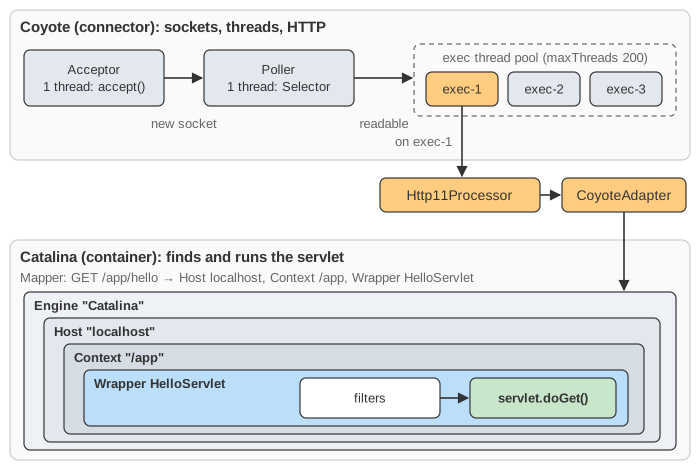
The component tree
The same tree appears in conf/server.xml:
<Server port="8005" shutdown="SHUTDOWN">
  <Service name="Catalina">
    <Connector port="8080" protocol="HTTP/1.1" connectionTimeout="20000"
               maxThreads="200" maxConnections="8192" acceptCount="100"/>   <!-- Coyote -->
    <Engine name="Catalina" defaultHost="localhost">                         <!-- Catalina -->
      <Host name="localhost" appBase="webapps">
        <Valve className="org.apache.catalina.valves.AccessLogValve" .../>
        <!-- each web app is a Context: webapps/app → /app;
             each servlet in it is a Wrapper -->
      </Host>
    </Engine>
  </Service>
</Server>
- A Service joins one or more Connectors to one Engine.
- Engine → Host → Context → Wrapper are the four container levels: all requests, one virtual host, one web application, one servlet. Each has a Pipeline: a list of Valves ending in a basic valve (
StandardEngineValve,StandardHostValve, …) that calls the next level down. Valves are Tomcat's own interceptors, like servlet Filters but for the whole server.
The threads of the NIO connector
Take a thread dump of a running Tomcat and you will see them by name:
http-nio-8080-Acceptor: one thread in a loop. It first waits on aLimitLatchuntil Tomcat holds fewer thanmaxConnectionssockets, then blocks inServerSocketChannel.accept(). It makes each new socket non-blocking, wraps it in aNioChanneland aNioSocketWrapper, and hands it to the Poller as aPollerEvent. It never reads a byte.http-nio-8080-Poller: one thread that owns a Java NIOSelector(epoll on Linux, kqueue on macOS; see the epoll page). It registers new sockets forOP_READand loops onselect(). When a socket becomes readable, it removes read interest from that key (so it will not report it twice) and passes aSocketProcessorto the executor. It also closes connections that have been idle too long. It never parses anything either.http-nio-8080-exec-N: the worker pool (maxThreads, default 200). A worker runs theSocketProcessor: it reads and parses the request, runs the container and the servlet, and writes the response.
This split is the point of NIO. An idle keep-alive connection costs a Selector key and some buffers, not a thread. The old blocking connector (BIO, removed in Tomcat 8.5) kept one thread per connection even between requests, so 200 threads meant at most 200 open connections.
Three different limits
| Setting (default) | What it limits | When it is full |
|---|---|---|
acceptCount (100) | The kernel's listen backlog: connections the handshake has finished but Tomcat has not accept()ed. | New connections are refused, or on Linux their SYN is dropped and the client retries until it times out. |
maxConnections (8192) | Sockets Tomcat holds open at once, idle or busy. | The Acceptor stops calling accept(); new connections wait in the backlog. |
maxThreads (200) | Requests being processed at once. | Ready sockets wait in the executor's TaskQueue. Their bytes sit unread. |
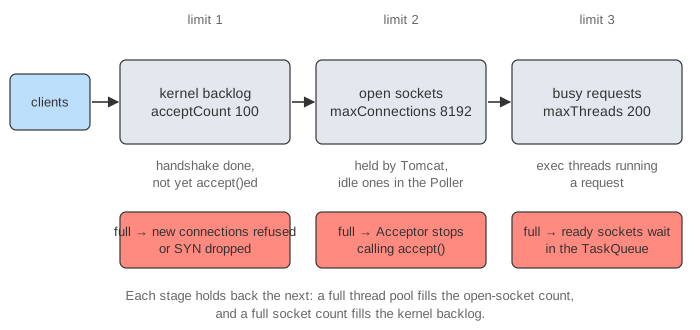
Try Demo: maxConnections, acceptCount and Demo: thread pool full. One detail of Tomcat's pool is visible in the second demo: a JDK ThreadPoolExecutor starts extra threads only when its queue is full, but Tomcat's TaskQueue refuses a task while the pool is below maxThreads, so Tomcat adds threads first and queues only at maxThreads. The pool starts with minSpareThreads threads (default 10; 1 in the animation), and threads idle for 60 s are stopped again.
Inside the worker thread
SocketProcessor.doRun()finishes the TLS handshake if there is one, then callsConnectionHandler.process(), which finds the protocol's processor: for HTTP/1.1 anHttp11Processor, taken from a cache of recycled ones.Http11Processor.service():Http11InputBufferparses the request line and the headers into aorg.apache.coyote.Request. It reads without blocking. If the headers are not all there yet it returnsSocketState.LONG: the processor stays attached to the socket, read interest goes back to the Poller, and the thread is free (Demo: slow client). Parsed values are kept as byte ranges (MessageBytes) and turned into Strings only when someone asks.CoyoteAdapter.service()wraps the Coyote request and response in Catalina'sRequestandResponse, which implementHttpServletRequest/Response(your code sees them through facades).postParseRequest()decodes and normalizes the URI (/app/./a/../hello→/app/hello), then asks the Mapper.Mapper.map()picks the Host from theHostheader, the Context by the longest matching context path, and the Wrapper by the servlet rules, in this order: exact match, longest path prefix (/api/*), extension (*.jsp), then the default servlet/. The Mapper is kept up to date by a listener as applications are deployed and removed.- The pipelines.
CoyoteAdaptercallsengine.getPipeline().getFirst().invoke(request, response).StandardEngineValvecalls the Host's pipeline:AccessLogValve,ErrorReportValve, thenStandardHostValve, which sets the web app's class loader as the thread's context class loader. The Context's pipeline runs the authenticator valve (security constraints) andStandardContextValve, which refuses direct requests for/WEB-INFand/META-INF. StandardWrapperValvegets the servlet instance withwrapper.allocate(). On the first request (unlessload-on-startupis set) this loads the class, creates one instance and callsinit(). It then builds anApplicationFilterChainfrom the filters whose mappings match.ApplicationFilterChain.doFilter()calls each filter; each filter callschain.doFilter()to go on, and the last call goes toservlet.service(), whichHttpServletturns intodoGet,doPost, …- On the way back
ErrorReportValveturns an error status with no<error-page>into Tomcat's HTML error page (Demo: 404).CoyoteAdaptercallsresponse.finishResponse(), andHttp11OutputBufferwrites the status line, headers and whatever is left in the 8 KB response buffer. A servlet that writes more than the buffer holds commits the response early: the headers go out, and headers can no longer be changed. - Keep-alive or close. With keep-alive the processor and the request and response objects are recycled,
service()returnsSocketState.OPENand the socket goes back to the Poller. WithConnection: close, an error, or aftermaxKeepAliveRequests(100) requests on one connection, the socket is closed and theLimitLatchcounts down.
This is what a stack trace from inside a servlet looks like (Tomcat 10.1, line numbers removed). Read it from the bottom up; it is exactly the row of boxes in the animation:
at com.example.HelloServlet.doGet(HelloServlet.java)
at jakarta.servlet.http.HttpServlet.service(HttpServlet.java)
at org.apache.catalina.core.ApplicationFilterChain.internalDoFilter(ApplicationFilterChain.java)
at org.apache.catalina.core.ApplicationFilterChain.doFilter(ApplicationFilterChain.java)
at org.apache.catalina.core.StandardWrapperValve.invoke(StandardWrapperValve.java)
at org.apache.catalina.core.StandardContextValve.invoke(StandardContextValve.java)
at org.apache.catalina.authenticator.AuthenticatorBase.invoke(AuthenticatorBase.java)
at org.apache.catalina.core.StandardHostValve.invoke(StandardHostValve.java)
at org.apache.catalina.valves.ErrorReportValve.invoke(ErrorReportValve.java)
at org.apache.catalina.valves.AbstractAccessLogValve.invoke(AbstractAccessLogValve.java)
at org.apache.catalina.core.StandardEngineValve.invoke(StandardEngineValve.java)
at org.apache.catalina.connector.CoyoteAdapter.service(CoyoteAdapter.java)
at org.apache.coyote.http11.Http11Processor.service(Http11Processor.java)
at org.apache.coyote.AbstractProcessorLight.process(AbstractProcessorLight.java)
at org.apache.coyote.AbstractProtocol$ConnectionHandler.process(AbstractProtocol.java)
at org.apache.tomcat.util.net.NioEndpoint$SocketProcessor.doRun(NioEndpoint.java)
at org.apache.tomcat.util.net.SocketProcessorBase.run(SocketProcessorBase.java)
at org.apache.tomcat.util.threads.ThreadPoolExecutor.runWorker(ThreadPoolExecutor.java)
at org.apache.tomcat.util.threads.ThreadPoolExecutor$Worker.run(ThreadPoolExecutor.java)
at org.apache.tomcat.util.threads.TaskThread$WrappingRunnable.run(TaskThread.java)
at java.base/java.lang.Thread.run(Thread.java)
When the servlet is slow
From SocketProcessor to doGet everything runs on one worker thread, and a servlet that waits for a database or another service keeps that thread (Demo: thread pool full). When all maxThreads threads are waiting, new requests queue even though the CPU is idle. The ways out:
- Async servlets (
request.startAsync()):doGetreturns at once, the processor returnsSocketState.LONGand the thread goes back to the pool. Later another thread callsasyncContext.complete()ordispatch(), and the connection is processed again. - Virtual threads (Tomcat 10.1 and 11 on Java 21+,
useVirtualThreads="true"on the Connector): each task runs on a new virtual thread instead of a pooled platform thread, so a blocked request costs little memory.maxThreadsthen no longer limits concurrency;maxConnectionsstill does. - More threads, for work that really is blocking, and timeouts on every outgoing call.
Objects are reused
Tomcat creates almost nothing per request. Processors, Request/Response objects, their buffers, SocketProcessors and PollerEvents are recycled, and threads are reused. This is fast, but it gives some bugs a specific shape:
- Do not keep the request or response after the request ends (for example in another thread, without async). The object has been recycled and may already belong to someone else's request.
- One servlet instance serves all threads, so fields of a servlet are shared data and need to be thread-safe.
ThreadLocals outlive the request because the thread is reused: clear them (logging MDC, security context) in afinally. AThreadLocalholding a class from the web app also keeps the app's class loader alive after it is undeployed, which Tomcat reports as a memory leak.
Other protocols
- HTTPS: the same path;
SecureNioChanneldoes the TLS handshake and decryption beforeHttp11Processorsees the bytes. - HTTP/2: after the upgrade (or ALPN on TLS) an
Http2UpgradeHandlerowns the connection. It reads frames and runs each stream as its own request on a worker thread, so one connection can have several requests in the container at once. - WebSocket: after the upgrade the connection belongs to the WebSocket endpoint; the Poller still wakes a worker only when a frame arrives.
- NIO2 (
Http11Nio2Protocol) uses asynchronous channels and completion handlers instead of a Poller. The APR/native connector was removed in Tomcat 10.1.
Reading the symptoms
- Requests slow, CPU idle, all
execthreads in the same wait in a thread dump: the pool is exhausted by blocking calls (a slow database, a missing timeout). RaisingmaxThreadsonly hides it. - Clients see connection timeouts or refusals under a burst: the backlog (
acceptCount) overflowed, usually becausemaxConnectionswas reached. - Many connections, few threads busy: normal for NIO; idle keep-alive connections sit in the Selector.
keepAliveTimeout(default:connectionTimeout, 20 s in the shippedserver.xml) decides how long they stay. - The live numbers are in JMX: the
ThreadPoolMBean (currentThreadsBusy,connectionCount) and theGlobalRequestProcessorMBean (request count, processing time).