The idea: many rules, one value
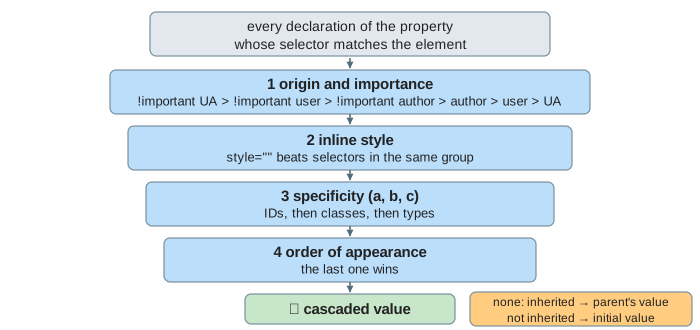
Several CSS rules can set the same property on the same element. The browser's style sheet says one thing, the page says another, and the element's own style attribute a third. The cascade is the fixed procedure that picks one winner. It works per property: for each property of each element, the browser collects every declaration whose selector matches the element, then filters them with four questions, in this order, until one is left. The winner is the cascaded value.
The page styles one element, <p id="intro" class="note big">, inside <div id="main" class="card">. Each rule set on the canvas is a short list of declarations, numbered in the order they appear. Run the cascade and watch the candidates drop out step by step. Toggle !important changes one row so you can rerun it. How the browser parses the CSS and then lays out and paints the result is on How a Browser Renders a Page.
Step 1: origin and importance
Every declaration comes from an origin. The user-agent (UA) style sheet is the browser's defaults, for example p { margin-top: 1em }. The user style sheet is set by the reader, for example a bigger font for low vision. The author style sheets are the page's own CSS, including the style attribute. Adding !important to a declaration moves it into a stronger group, and the order of the origins flips for important declarations:
| rank | group |
|---|---|
| 6 (strongest) | !important user-agent |
| 5 | !important user |
| 4 | !important author |
| 3 | normal author (style sheets and style="") |
| 2 | normal user |
| 1 (weakest) | normal user-agent |
Normally the page beats the reader. With !important the reader beats the page, so a user who needs 24px text can always get it. In Demo 5: user !important beats author !important the candidates are a user p at 20px, a user p at 24px !important, an author p at 14px and an author #intro at 12px !important. Step 1 keeps only the important user declaration: the result is 24px, even though #intro has the bigger selector. Specificity never gets a say across groups. Demo 6 removes the user's !important; now the important author rule wins and the text is 12px.
Step 2: inline style
A declaration in the element's style attribute is attached to the element itself. Inside the same group it beats every selector, before specificity is even looked at. In Demo 3: inline style beats an ID selector, #main #intro { color: blue } has specificity (2,0,0), but style="color: purple" wins. In Demo 4, p { color: gray !important } is in a stronger group (important author) than the normal inline style, so step 1 already throws the inline style out and the text is gray.
Step 3: specificity (a, b, c)
The specificity of a selector is three counts: a = ID selectors, b = class selectors, attribute selectors and pseudo-classes, c = type selectors and pseudo-elements. The universal selector *, combinators and :where(…) add nothing. Two specificities are compared a first; b only matters if the a's are equal, and c only if the b's are equal too. They are not one decimal number: eleven classes are still less than one ID.
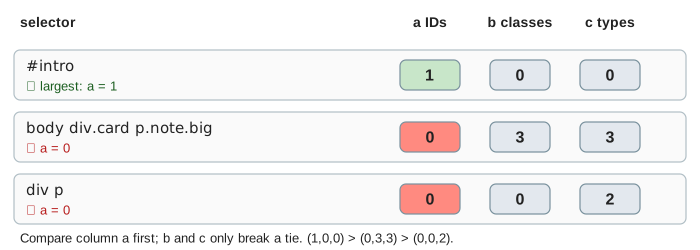
In Demo 1: one ID beats three classes, five declarations match the <p>: p (0,0,1), .note (0,1,0), div p (0,0,2), #intro (1,0,0) and body div.card p.note.big (0,3,3). span does not select the <p> at all, so it is never a candidate. All five are normal author declarations and none is inline, so steps 1 and 2 are ties. Step 3 picks #intro: the text is blue, even though the long selector comes later.
Step 4: order of appearance
If everything so far is equal, the declaration that comes last wins. Order counts across all the style sheets of a group, in the order they are loaded. In Demo 2: equal specificity, the later rule wins, .note { color: green } (#2) and .big { color: red } (#3) both have (0,1,0). * and :where(#intro) are (0,0,0) and drop out at step 3. Step 4 picks #3, so the text is red. Swap the two rules in a real style sheet and it turns green.
Inherited or initial, and the computed value
When no declaration sets a property on the element, the cascade has no winner. Then it depends on the property. An inherited property (color, font-size, font-family, line-height, …) takes the parent's computed value. A non-inherited property (margin, padding, border, background-color, width, …) takes its initial value from the spec. The keyword inherit forces inheriting for any property, and initial forces the initial value.
The computed value turns relative values into absolute ones where it can. em in font-size means the parent's font-size; in any other property it means the element's own font-size. In Demo 7: inherited or initial value the rules .card { color: navy; font-size: 20px; background-color: #eeeeee } select the <div>, not the <p>:
| property of the <p> | inherited? | cascaded value | computed value |
|---|---|---|---|
color | yes | none, inherit from the <div> | navy |
font-size | yes | p { font-size: 1.2em } | 1.2 × 20px = 24px |
margin-top | no | UA p { margin-top: 1em } | 1 × 24px (its own font-size) = 24px |
background-color | no | none, initial value | transparent |
The grey of the card still shows behind the paragraph, but only because the paragraph's own background is transparent. And a child of the <p> inherits 24px, the computed value, not 1.2em; otherwise the text would grow at every level.
See also How a Browser Renders a Page: the style step there is this cascade, run for every element, before layout and paint. And see Virtual DOM diffing: a setAttribute("class", …) patch changes which selectors match, so the cascade runs again for that element.
See also DOM Events: Capture, Target and Bubble, which sends a click through the same kind of small document and shows which listeners hear it, and in what order.
See also CSS Layout: Box Model, Flexbox and Grid: once the cascade has picked the width, padding and flex values, layout turns them into pixel widths step by step.
What the page leaves out
Cascade layers (@layer, a step between inline style and specificity: a later layer beats an earlier one for normal declarations, and the order flips for !important), @scope proximity, shadow DOM context, the animation and transition origins (animations sit above normal author declarations, transitions above everything), the keywords unset, revert and revert-layer, :is(), :not() and :has() (they count as their most specific argument), attribute selectors and combinators other than the descendant space, shorthand properties, custom properties and var(), and the used and actual values that layout and rounding produce after the computed value.