The idea: asking the kernel to do something for you
A program cannot touch the terminal, a file or another process by itself. Only the kernel can. A system call is how a program asks. It puts a number and a few arguments in CPU registers and executes one special instruction, syscall. The CPU switches to kernel mode, the kernel does the work, and the CPU comes back with a result.
In the animation, process app (pid 4242) makes the calls. User space is at the top and kernel space below. The only way between them is the gate. (Demo: write() end to end.)
![app (pid 4242) calls write(1, msg, 6); the libc wrapper sets RAX = 1 and executes syscall, which passes the single gate into kernel space; the kernel saves registers in pt_regs, looks up sys_call_table[1] = sys_write, copies 6 bytes to fd 1 (the terminal), restores registers with RAX = 6 and returns with sysretq](Images/systemcall/syscall-path.svg)
The steps of one call
- The program calls a C library function, like
write(1, msg, 6). It is an ordinary function call; the arguments are in registers. - The wrapper puts the system call number in RAX (1 = write) and executes
syscall. The CPU switches from user mode (ring 3) to kernel mode (ring 0) and jumps to the kernel's one entry point. - The kernel saves the program's registers on its own stack, in a structure called
pt_regs. - The number picks the handler from the system call table:
sys_call_table[1]issys_write. - The handler does the work. For write: find fd 1 in the process's fd table (the terminal), copy the bytes in, send them to the terminal.
- The kernel restores the registers, puts the result in RAX, and
sysretqgoes back to user mode. - The wrapper checks the result and returns it to the program.
Why there is only one door
Kernel memory is in every process's address space, but in user mode the CPU refuses to touch it. If a program could jump to any kernel address in kernel mode, it could skip every check. So syscall always jumps to the same entry point, and the program can only choose a number. The kernel checks the number before using it.
Registers in, registers out
| Register | Holds |
|---|---|
RAX | the system call number going in, the result coming out |
RDI, RSI, RDX (then R10, R8, R9) | the arguments |
RCX | the return address, saved by the CPU |
User pointers and errno
A pointer from a program might point anywhere, so the kernel never reads it directly. copy_from_user and copy_to_user check the address and copy the bytes. If nothing is mapped there, the copy fails safely and the call returns -EFAULT. The kernel does not crash.
The kernel reports every error as a negative number. The C library wrapper turns it into the C convention: it stores the positive number in errno and returns -1. (Demo: bad pointer → errno.)
A call that has to wait
read() on an empty pipe cannot finish yet. The kernel puts the process to sleep, still inside the system call, and gives the CPU to another process. When someone writes into the pipe, the kernel wakes the reader up. It continues inside read() where it stopped, copies the data, and returns. A waiting call uses no CPU time. (Demo: read(), then empty pipe.) A signal can also wake it early; then read() fails with EINTR, unless the signal handler was installed with SA_RESTART.
The vDSO: skipping the kernel
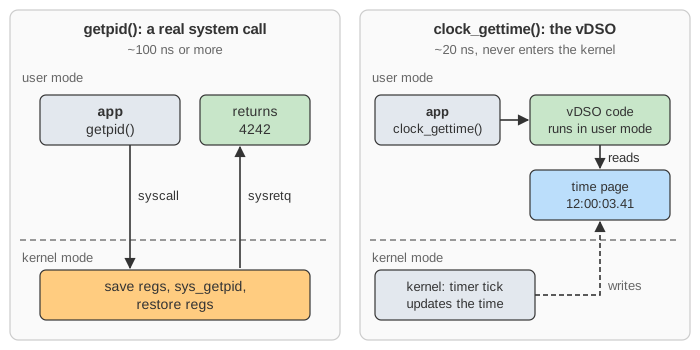
Entering and leaving the kernel costs around 100 ns, often more. That is a lot for something called millions of times a second, like reading the clock. So the kernel maps a tiny library, the vDSO, into every process, together with a page where it keeps the current time. clock_gettime() just reads that page, in user mode. It takes tens of nanoseconds, and strace does not even see it. (Demo: getpid() vs vDSO.)
| Kind of call | Typical cost | Enters the kernel? |
|---|---|---|
| ordinary function call | ~1 ns | no |
vDSO call (clock_gettime) | ~20 ns | no |
system call (getpid) | ~100 ns or more | yes |
Watching system calls
strace -p PID prints every system call of a process with its arguments and result, as in the log under the canvas. The nginx proxy request shows a whole web request as a list of system calls, and epoll shows how a server waits for many sockets with one call.
What the page leaves out
The real entry code does more: swapgs, a page-table switch on CPUs that need the Meltdown fix, security checks (seccomp), and checks for signals and rescheduling on the way out. Signals that interrupt a call (EINTR, SA_RESTART) are only described above. The page also leaves out more than one CPU and the scheduler (see Linux Context Switch), the older int 0x80 way in (it works like a device interrupt), and real addresses. The pipe really holds 64 KiB, not 10 bytes. How the program got its vDSO and its open files is on How Linux Loads a Program.