The idea: a picture glued to triangles
A texture is a small image whose pixels are called texels. To glue it to a surface, every vertex gets a texture coordinate (u, v): (0, 0) is one corner of the texture and (1, 1) the opposite one. For each pixel the GPU works out its own (u, v) and reads the texture at that point. The page uses an 8 × 8 texture with brightness 0 (ink) to 100 (paper) and a 16 × 16 frame buffer, so every texel and every pixel can be seen.
The surface on the page is a quad made of two triangles, T1 and T2, that fills the frame buffer. Its corners carry the UVs (0, 0), (m, 0), (m, m), (0, m). The surface select sets m: 1 for a near wall, 2 for a tiled wall, 5 for a far floor. How the triangles are split into pixels is on Rasterization; where texturing sits among the stages is on The Graphics Pipeline.
UV at the vertices, mixed per pixel
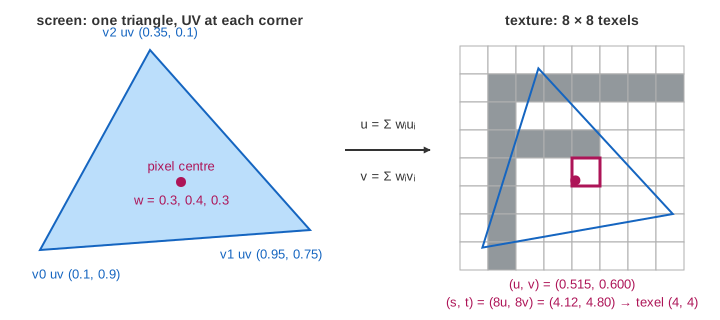
Pixel (x, y) is sampled at its centre (x + 0.5, y + 0.5). Its three edge values, divided by the triangle's doubled area, are the barycentric weights w0, w1, w2 of the corners. The same weights that mix depth also mix the UVs:
u = w0·u0 + w1·u1 + w2·u2, v = w0·v0 + w1·v1 + w2·v2
Then s = u·8 and t = v·8 is the point in texel space (v grows downwards here; OpenGL puts v = 0 at the bottom of the image). For pixel (5, 5) on the near wall: centre (5.5, 5.5) is in T1, the weights are 0.3125, 0.34375, 0.34375, so u = v = 0.34375 and s = t = 2.75. (Demo 1: UV at the vertices, one pixel)
Nearest and bilinear
Nearest (GL_NEAREST) takes the one texel that contains the point:
(floor s, floor t). At (2.75, 2.75) that is texel (2, 2) = 100. On the near wall one texel covers 2 × 2 pixels, so
nearest draws hard square blocks. (Demo 2: nearest, magnified: blocks)
Bilinear (GL_LINEAR) treats each texel's value as sitting at its centre and
mixes the 4 centres around the point. Subtract 0.5, split into whole and fractional parts:
2.75 − 0.5 = 2.25 gives texels 2 and 3 with fx = 0.25, the same for t. The weights are
(1−fx)(1−fy), fx(1−fy), (1−fx)fy, fx·fy:
0.5625·100 + 0.1875·100 + 0.1875·0 + 0.0625·0 = 75
So pixel (5, 5) shows 75 where nearest showed 100, and the edges of the F become grey ramps. (Demo 3: bilinear, magnified: smooth)
A far surface aliases
On the far floor the texture repeats 5 times across 16 pixels. One pixel step moves u by 5/16, which is ρ = 2.5 texels. The texture is now minified: a pixel covers a 2.5 × 2.5 block of texels, but nearest still reads only one of them. The checker texture is a 1-texel checkerboard whose true average is 50; the pixel centres land on texels 1, 3, 6, 8, 11, 13 … and the picture comes out as big 2 × 2 pixel blocks of 0 and 100, 128 pixels each. Those blocks are not in the texture. That is aliasing, the same folding as on Sampling and Aliasing: a pattern finer than the pixel grid shows up as a coarser false one. When the camera moves, the false pattern crawls and shimmers. (Demo 4: far floor, nearest aliases)
Bilinear does not fix it. It mixes 4 texels, but the pixel covers about 6: the result is a false pattern of 37.5 and 62.5, with less contrast but still there.
Mipmaps and choosing a level
The fix is to average before sampling. A mipmap is the texture plus a chain of smaller copies,
each half as wide: 8 × 8, 4 × 4, 2 × 2, 1 × 1. Each texel of a level is the mean of a 2 × 2 block of the level
above. For the F, level 1 texel (0, 0) = (100 + 100 + 100 + 0) / 4 = 75, level 2 texel (0, 0) = 56.25, and
level 3 = 75 is the average of the whole F. The chain costs 64 + 16 + 4 + 1 = 85 texels, a third more memory.
glGenerateMipmap builds it once. (Demo 5: building the mipmap chain)
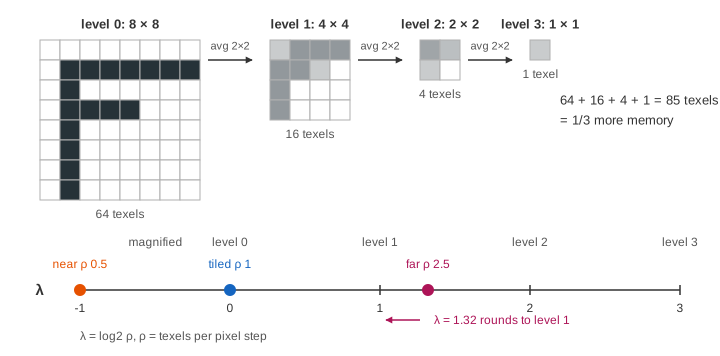
The sampler measures ρ, the number of level-0 texels one pixel step covers, and computes the level of detail λ = log2 ρ. Level d has texels 2d wide, so at level λ one pixel covers about one texel.
| surface | ρ | λ | level used (mipmap) |
|---|---|---|---|
| near wall, UV 0–1 | 0.5 | −1 | 0, magnified: bilinear on level 0 |
| tiled, UV 0–2 | 1 | 0 | 0 |
| far floor, UV 0–5 | 2.5 | 1.32 | 1 (4 × 4) |
The page's mipmap filter is GL_LINEAR_MIPMAP_NEAREST: round λ to the nearest level, then
bilinear in it. On the far floor every level-1 texel of the checker is already 50, so all 256 pixels show 50:
the true grey and no pattern. (Demo 6: mipmap fixes the far floor)
GL_LINEAR_MIPMAP_LINEAR (trilinear) samples the two levels around λ and mixes
them, so there is no visible seam where the level changes.
| far floor, checker | values | looks like |
|---|---|---|
| nearest | 0 and 100 | false 2 × 2 blocks ✗ |
| bilinear | 37.5 and 62.5 | weaker false blocks ✗ |
| mipmap (level 1) | 50 everywhere | even grey ✓ |
A GPU gets ρ from the differences of u and v between neighbouring pixels: it shades pixels in 2 × 2 quads so these derivatives are always at hand. On the page's flat quad ρ is the same everywhere; on a floor seen in perspective it grows with distance, so near rows use level 0 and far rows use higher levels.
Wrap modes: repeat and clamp
UVs may go past 0…1. The wrap mode says what a texel index outside the texture means.
Repeat (GL_REPEAT) keeps the fractional part, so on the tiled wall (UV 0–2) the
F appears 2 × 2 times: pixel (x, y) shows texel (x mod 8, y mod 8). Clamp
(GL_CLAMP_TO_EDGE) uses the last texel for any index past the edge: one F in the top-left
quarter, and its row 1 bar and column 1 stem, which touch the edges, are stretched to the end of the quad.
(Demo 7: wrap repeat and Demo 8: wrap clamp)
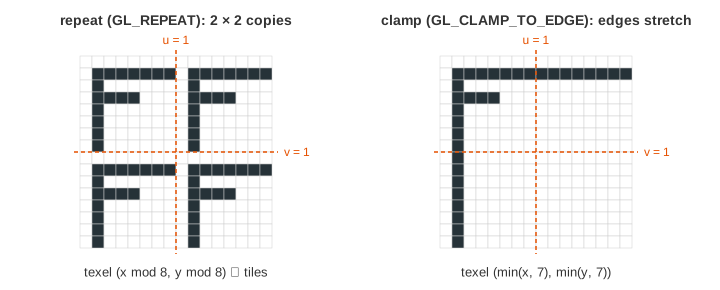
Repeat suits tiles, bricks and grass. Clamp suits a decal or a sky picture that must not bleed in from the other side; with bilinear, repeat at u near 1 would mix in texels from u = 0.
See also Shadow Mapping, where the texture holds depths from the light and each lookup is a depth compare instead of a colour.
What the page leaves out
Perspective-correct interpolation: on a surface seen at an angle, u and v are not linear on the screen; GPUs interpolate u/w, v/w and 1/w and divide per pixel (the page's quad faces the camera, so plain weights are exact). Also left out: trilinear and anisotropic filtering (several samples along the long axis of a stretched footprint), λ from per-pixel derivatives, LOD bias and min/max level, mirrored-repeat and border-colour wrap, colour textures and sRGB decoding, texture compression (BC/ASTC), texture caches and tiling in memory, and texel-centre rules that differ between APIs.