The idea: thin lines where the brightness jumps
An edge is a place where the brightness changes fast: the outline of an object, a shadow, a letter. A good edge detector finds the real edges, marks each one as a line one pixel wide in the right place, and ignores noise. John Canny wrote down these three goals in 1986 and built a detector from five simple steps. Each step fixes a problem the step before it leaves behind.
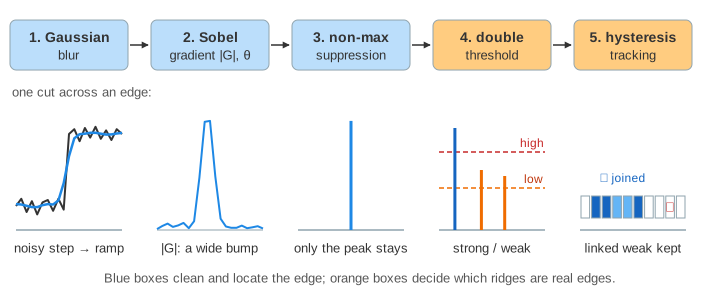
The page works on a 10 × 10 image so every number fits on the screen. Pixel (x, y) means column x, row y, both counted from 0, with y going down. The six panels are the image and the result of each step.
1. Smooth first
Edges are found with a derivative: the difference between neighbouring pixels. A derivative makes noise worse, because noise is exactly a lot of small pixel-to-pixel jumps. So Canny first blurs the image with a Gaussian kernel. The page uses the 3 × 3 one, weights 1 2 1 / 2 4 2 / 1 2 1 divided by 16. For pixel (4, 4) of the step edge the weighted sum is 1040, and 1040 / 16 = 65: the jump from 40 to 140 becomes a short ramp 40, 65, 115, 140. How a kernel slides over an image is shown step by step in Convolution in a CNN.
On the noisy square (noise up to ±50) the difference is large. Without blur the detector reports 37 edge pixels, and 28 of them are not on the square's outline. With blur it reports exactly the 12 outline pixels (Demo 3: noise without blur, Demo 4: the same noise, blurred first). A wider Gaussian removes more noise but also rounds corners and merges edges that are close together.
2. Gradient size and direction
The Sobel kernels give two slopes at each pixel. Gx is the right column minus the left column of the 3 × 3 window, with weights 1, 2, 1; Gy is the bottom row minus the top row. Together they are the gradient, an arrow that points to where the brightness rises fastest:
|G| = √(Gx² + Gy²)          how strong the edge is
θ   = atan2(Gy, Gx)          the direction across the edge
On the step edge, pixel (4, 4) has Gx = 300 and Gy = 0, so |G| = 300 and θ = 0°: the brightness rises to the right. But pixel (5, 4) also has 300, and (3, 4) and (6, 4) have 100. A plain threshold on |G| would give an edge 2 to 4 pixels wide. That is the problem the next step solves.
3. Non-maximum suppression
The edge should be where |G| is largest across the edge. So each pixel is compared with its two neighbours along the gradient direction. θ is rounded to one of four lines, which name the two neighbours:
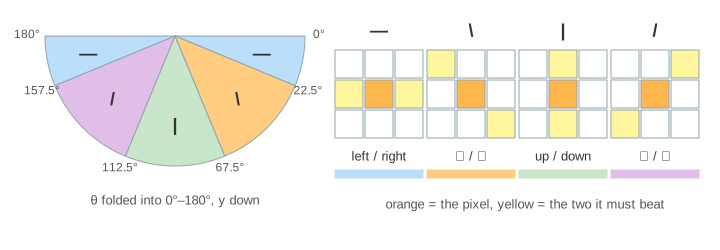
A pixel stays only if its |G| is larger than the neighbour behind it and at least as large as the one ahead; otherwise it becomes 0. The rule is uneven on purpose. On the step edge (4, 4) and (5, 4) are both 300. With "≥" on both sides both would stay, with ">" on both sides neither would. With this rule (4, 4) stays and (5, 4) goes, so the edge is one line in column 4 (Demo 1: step edge, all five stages). On the bright square the 64 pixels with |G| > 0 shrink to a closed outline of 12 (Demo 2).
On a 45° edge the neighbours across the edge are diagonal, two steps apart in x + y. The two rows of pixels next to the jump tie at 311 and both beat their diagonal neighbours (61 and 185), so the line comes out as a staircase of 17 strong pixels, not a single diagonal (Demo 8: diagonal edge). The staircase is still thin in the sense that matters: no pixel can be removed without breaking the line into pieces that do not touch at a side.
4. Double threshold
After thinning, some ridges are weak: faint edges and noise both give small |G|. Canny uses two thresholds.
A pixel with |G| ≥ high is a strong pixel and certainly an edge. A pixel between
low and high is weak: it may be an edge or noise. Below low it is dropped. The page
uses low 130 and high 200. OpenCV's cv2.Canny(img, 100, 200) takes the same two numbers, and a
ratio of 1 : 2 to 1 : 3 between them is the usual advice.
5. Hysteresis edge tracking
A weak pixel is kept only if it is connected to a strong pixel, through its 8 neighbours and possibly through other weak pixels. This is a flood fill (breadth-first search) that starts from all strong pixels at once and may only walk onto weak pixels; see Flood Fill and Breadth-First Search. The idea: a real edge is long, so a faint stretch of it is still attached to a bright stretch. Noise makes short, isolated blobs.
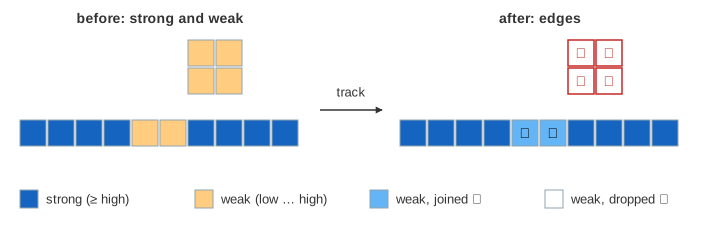
The fading edge shows why one threshold is not enough. Its middle has less contrast, so after thinning it has |G| = 187 there, and a faint spot nearby gives four weak pixels too:
| thresholds | edge pixels | what happens |
|---|---|---|
| low 130 / high 200 | 10 | 8 strong + 2 weak joined; the 4 spot pixels are dropped (Demo 5) |
| one threshold 200 | 8 | the faint middle is lost: the edge breaks into two pieces (Demo 6) |
| one threshold 130 | 14 | the edge is whole, but the 4 spot pixels count as edges too (Demo 7) |
So the high threshold decides where edges start, and the low threshold decides how far they may continue. That is the meaning of hysteresis: the answer for a pixel depends on what is around it.
Choosing the settings
- More blur (a larger σ): less noise, but blunt corners and nearby edges merged.
- Higher thresholds: fewer, cleaner edges, more gaps. Lower: more complete edges, more clutter.
- Scale the thresholds with the image: |G| grows with the contrast. Some tools set them from the median brightness.
Edges are a common first step before finding lines and shapes, matching features, or as input to segmentation. The same blocks appear elsewhere on this site: compressed images such as JPEG blur edges and add ringing next to them, which an edge detector will pick up.
See also Morphology: Erosion and Dilation, which finds an object's outline from its shape alone, as the image minus its erosion.
See also the Hough transform, which takes the edge pixels Canny finds and lets them vote for the straight lines they lie on.
See also Object Detection: IoU, Non-Maximum Suppression and AP for non-maximum suppression on boxes instead of edge pixels.
See also Thresholding and Otsu's Method, which separates objects by grey level rather than by edge strength, and picks the threshold from the histogram.
See also Harris Corner Detection, which uses the same image gradients to find corners instead of edges.
What the page leaves out
Real images are thousands of pixels wide and need a larger Gaussian (σ = 1–2, a 5 × 5 or bigger kernel). Canny's
paper and some libraries interpolate between the two nearest neighbours in stage 3 instead of rounding θ to four lines,
which gives thinner diagonals. OpenCV uses |Gx| + |Gy| unless L2gradient=True, works on whole numbers,
compares with ">" against the thresholds, and handles the border differently. Colour images, automatic thresholds,
sub-pixel edge positions, other detectors (Laplacian of Gaussian, zero crossings, learned detectors) and the
Hough transform that turns edges into lines are not shown.