The idea: carry bytes through places that only accept text
Email bodies, JSON strings, URLs, HTTP headers and HTML attributes were made for
text. Raw bytes break them: a zero byte, a line break or a quote ends the field
early. Base64 writes any bytes using only 64 safe characters
(A–Z a–z 0–9 + /), so they can pass through
unchanged. The price is size: every 3 bytes become 4 characters.
3 bytes → 4 characters
64 = 26, so one character carries exactly 6 bits. The smallest number of bytes that splits evenly into 6-bit pieces is 3: 3 × 8 = 24 = 4 × 6. The encoder takes 3 bytes, writes their 24 bits in a row, reads them back 6 at a time, and looks each 6-bit number (0–63) up in the alphabet. Demo: Man → TWFu is the textbook example:
Other ways to read a group of bits as a number (unsigned, two's complement, fixed point, IEEE 754 floating point) are animated in Number Systems: Two's Complement, Fixed Point and IEEE 754.
| text | M | a | n | |||||||||
|---|---|---|---|---|---|---|---|---|---|---|---|---|
| bytes | 0x4D = 01001101 | 0x61 = 01100001 | 0x6E = 01101110 | |||||||||
| 6-bit pieces | 010011 = 19 | 010110 = 22 | 000101 = 5 | 101110 = 46 | ||||||||
| characters | T | W | F | u | ||||||||
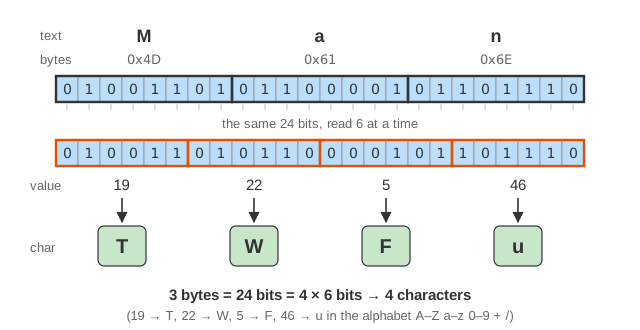
The alphabet is in index order: A–Z are 0–25,
a–z are 26–51, 0–9
are 52–61, then + = 62 and / = 63.
Padding and the size formula
When the input length is not a multiple of 3, the last group has 1 or 2 bytes.
The encoder adds zero bits up to the next 6-bit boundary and writes
= for each character that carries no data
(Demo: padding):
| last group | bits | + zero bits | characters | example |
|---|---|---|---|---|
| 3 bytes | 24 | 0 | 4 | Man → TWFu |
| 2 bytes | 16 | 2 | 3 + = | Ma → TWE= |
| 1 byte | 8 | 4 | 2 + == | M → TQ== |
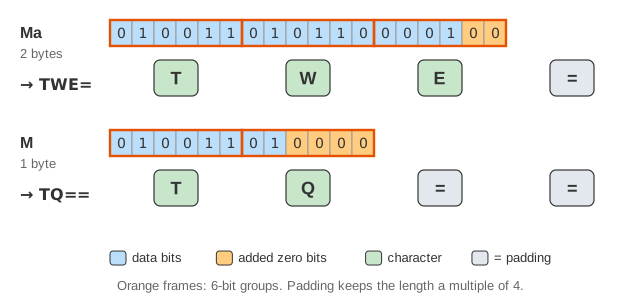
With padding, n bytes always become 4·⌈n/3⌉ characters, about 33 % more. Without padding they become ⌈4n/3⌉. Padding keeps the length a multiple of 4. That lets a decoder read 4 characters at a time and lets you join two encoded strings safely. Since the decoder can work out the byte count from the length anyway, many formats leave the padding out.
Text is bytes first: UTF-8
Base64 encodes bytes. To encode text, you first have to pick a
character encoding, and today that is almost always UTF-8.
ASCII letters are one byte each, but é is two (C3 A9)
and 👋 is four (F0 9F 91 8B). So Hi 👋
is 7 bytes and encodes to SGkg8J+Riw==
(Demo: UTF-8 first). JavaScript's btoa() accepts only
characters below 256 and throws on 👋. Encode with
TextEncoder first, or use Uint8Array.prototype.toBase64().
Variants: standard, base64url, MIME
| variant | 62, 63 | padding | line breaks | used in |
|---|---|---|---|---|
| standard (RFC 4648 §4) | + / | yes | no | data: URIs, JSON, Basic auth |
| base64url (RFC 4648 §5) | - _ | usually no | no | JWT, URLs, file names, WebAuthn |
| MIME (RFC 2045) | + / | yes | CRLF every 76 characters | email attachments |
| PEM (RFC 7468) | + / | yes | every 64 characters | certificates and keys |
In a URL, + can be read as a space and / as a path
separator, so base64url swaps them for - and _. The
two alphabets differ only in those two characters. A string that contains
neither is valid in both. Demo: base64url encodes the same bytes both
ways, then shows a base64url decoder rejecting a +.
Decoding, and the inputs it rejects
Decoding runs the steps backwards: look each character up, write 6 bits each, cut the bits into bytes, and drop the bits that belong to the padding (Demo: decode). Some inputs cannot come from a correct encoder (Demo: bad input):
| input | problem | strict (RFC 4648) | lenient (atob, WHATWG) |
|---|---|---|---|
TW@u | @ is not in the alphabet | error | error |
TWE | length not a multiple of 4 (missing =) | error | Ma |
T | 6 bits cannot make a byte | error | error |
TWF= | leftover bits 01 are not zero | error (non-canonical) | Ma |
TQ=A | = in the middle | error | error |
Rejecting non-zero leftover bits matters when Base64 strings are compared or
signed. With a lenient decoder, TWE= and TWF= are two
different strings that decode to the same bytes.
Encoding, not encryption
Base64 has no key. Anyone can reverse it. Authorization: Basic
dXNlcjpwYXNz sends user:pass in readable form
(Demo: not encryption), so Basic auth is only safe over
HTTPS. A JWT's header and payload are
base64url JSON that anyone can read. Only the
signature protects them, and it stops
changes, not reading (see OAuth). Base64 is not
compression either: it makes data bigger. To make data smaller, use a code
like Huffman coding.
| encoding | bits per character | size for 3 bytes | overhead |
|---|---|---|---|
| Base16 (hex) | 4 | 6 | +100 % |
| Base32 | 5 | 4.8 (8 per 5 bytes) | +60 % |
| Base64 | 6 | 4 | +33 % |
| Ascii85 / Z85 | ~6.4 | 3.75 (5 per 4 bytes) | +25 % |
Where you meet Base64: email attachments, data: URIs for small
images, PEM certificates, JSON fields that carry binary data, JWTs,
cookie values and HTTP Basic auth.
What the page leaves out
The page handles at most 24 bytes (8 groups). It removes whitespace in one step and does not show MIME line wrapping. It does not cover streaming decoders that keep up to 3 characters between chunks, or the SIMD codecs that encode many groups at once. It also leaves out other alphabets, such as the one bcrypt and crypt(3) use.