The problem: sharing access without sharing the password
alice keeps her photos at a photo service. A printing site, PrintIt, offers to print them. The old way was for PrintIt to ask for alice's photo-service password and log in as her. That is a disaster: PrintIt can do everything alice can (delete photos, change the password), for as long as it likes, alice cannot take access back without changing her password everywhere, and a breach at PrintIt leaks passwords.
OAuth 2.0 (RFC 6749) replaces the password with a token: a credential issued to PrintIt, for alice, limited to what she approved (the scope), for a limited time, and revocable. alice types her password only at the service that already knows it. OAuth is about authorization (what an app may do), not about logging in; that part is OpenID Connect, below.
The four roles
| Role | In the animation | What it does |
|---|---|---|
| Resource owner | alice (through her browser) | owns the data, approves or denies access |
| Client | PrintIt (printer.example) | the application that wants access; registered at the authorization server with a client_id |
| Authorization server | auth.example | logs alice in, asks for consent, issues codes and tokens (/authorize, /token) |
| Resource server | api.photos.example | the API holding the data; accepts requests that carry a valid access token |
Reading the canvas: each column shows what that party knows right now. Some things never change and are not drawn: the
authorization server has four registered clients (printit-web, -app, -job, -tv) and
signs tokens with its private key k1; the resource server trusts issuer auth.example, fetches the public key
k1 from its JWKS and only accepts tokens for its own audience api.photos.example (its checks under the
diagram show this for every request). alice types her password only at auth.example: neither PrintIt nor the API ever
sees it. The browser's address bar matters because history and logs keep every URL. Arrow colours:
front channel (through the browser),
back channel (server to server),
API call with a bearer token,
error / attacker,
user action.
The authorization code flow, step by step
- alice clicks "Import from Photos" at PrintIt. PrintIt redirects her browser to the authorization server:
/authorize?response_type=code&client_id=printit-web&redirect_uri=https://printer.example/cb&scope=photos.read&state=…&code_challenge=… - The authorization server checks the request (known client, exactly registered redirect URI, allowed scope), logs alice in if she has no session yet, and shows a consent page naming the client and the scope.
- alice clicks Allow. The server redirects her browser back to the
redirect_uriwith a one-time authorization code:https://printer.example/cb?code=…&state=… - PrintIt checks
state, then sends the code to the token endpoint directly, server to server, with its client credentials and the PKCEcode_verifier. - The authorization server checks everything and answers with an access token (and usually a refresh token).
- PrintIt calls the API with
Authorization: Bearer <access token>.
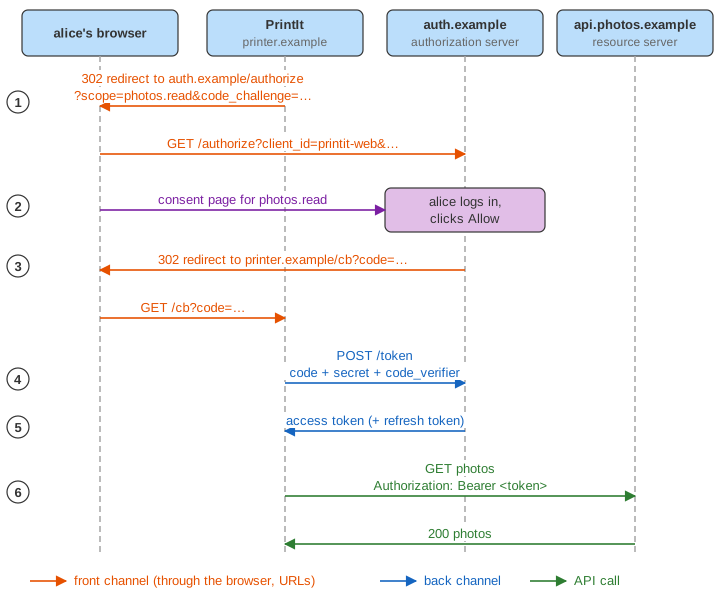
Why the detour through a code instead of handing out the token in step 3? Because of the channels.
Front channel and back channel
The front channel (orange arrows) is everything that goes through the browser: redirects and URLs. It is the only way to involve the user, but URLs are leaky: they stay in browser history, appear in server and proxy logs, go out in Referer headers, and on phones can be delivered to the wrong app. The back channel (blue arrows) is a direct HTTPS request from the client's server to the authorization server: nothing in between, and the client can authenticate itself.
OAuth therefore sends only the code in the front channel, and makes it nearly worthless on its own: it expires within a minute, works once, is bound to the client and the redirect URI, and (with PKCE) to a secret only the real client knows. The tokens travel only in the back channel. In the animation, the test harness checks that no token and no verifier ever appears on an arrow touching the browser.
Confidential and public clients
A confidential client runs on a server and can keep a client_secret; it authenticates at the token endpoint (here with HTTP Basic). A stolen code is useless to anyone without the secret. A public client, such as a mobile app or a single-page app, cannot keep a secret: anything in the app can be extracted from it. For those, the code alone used to be enough to get tokens, which is what made the next mechanism necessary.
PKCE: binding the code to the app that asked for it
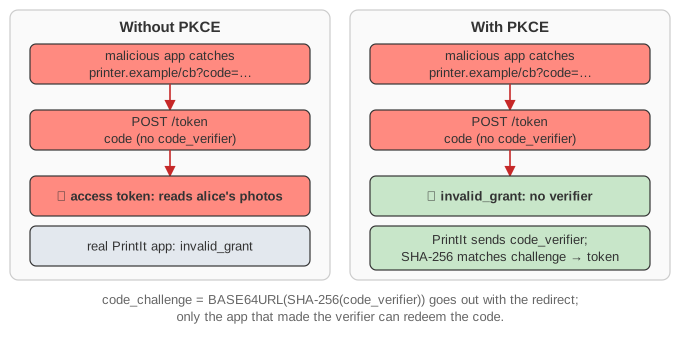
PKCE (Proof Key for Code Exchange, RFC 7636, "pixie") works like this: before the redirect the client makes a random code_verifier and sends only code_challenge = BASE64URL(SHA-256(code_verifier)) with the authorization request. The server stores the challenge with the code. At the token endpoint the client must send the verifier, and the server checks that its hash equals the challenge. An attacker who steals the code (or even sees the challenge) cannot produce the verifier, because SHA-256 cannot be reversed.
Run Demo: stolen code: a malicious app registered the same URL scheme as PrintIt's mobile app and catches the redirect. Without PKCE it redeems alice's code first and reads her photos, and the real app gets invalid_grant. With PKCE the attacker gets invalid_grant. OAuth 2.1 and the OAuth Security Best Current Practice (RFC 9700) require PKCE for all clients, confidential ones included.
state and CSRF on the callback
The callback URL /cb?code=… can be opened by anyone. In Demo: CSRF on the callback, mallory gets a code for her own account and makes alice's browser load printer.example/cb?code=mallory's code from a hidden image. A client that accepts any code then links alice's PrintIt session to mallory's photo account, and alice's uploads end up with mallory. The state parameter prevents this: the client makes a random value, keeps it in the user's session, and accepts the callback only if it carries the same value. PKCE protects against this too (the client has no verifier for a flow it did not start), which is why the Security BCP accepts either.
redirect_uri: exact matching
If the authorization server sent codes to any URI named in the request, a phishing link with PrintIt's client_id and redirect_uri=https://evil.example/cb would deliver alice's code to the attacker. The server therefore compares the redirect URI with the ones registered for the client, exactly (no prefix or wildcard matching), and on a mismatch shows an error itself instead of redirecting. Run Demo: errors.
Scopes and consent
A scope names a permission, such as photos.read or photos.write. The client asks for scopes, the user sees them on the consent page, and the token carries the ones granted. The API checks the scope on every request and answers 403 insufficient_scope when it is missing. Clients should ask for the least they need and ask for more later (incremental authorization): in Demo: scopes the consent page asks only for the new photos.write.
Access tokens: JWT or opaque, and bearer
An access token can be opaque (a random string the API looks up via token introspection, RFC 7662) or a JWT (RFC 9068): signed JSON the API verifies by itself, with the public key from the authorization server's JWKS. The API checks the signature, iss (the right issuer), aud (meant for this API), exp (not expired) and scope, exactly the five checks in the animation. A JWT needs no call to the authorization server, but it cannot be revoked before it expires: keep it short-lived.
Most access tokens are bearer tokens: whoever holds one can use it, as the attacker does in the stolen-code demo. Sender-constrained tokens bind the token to a key the client holds (DPoP, RFC 9449, or mutual TLS, RFC 8705), so a stolen token alone is not enough.
Refresh tokens and rotation
Short access tokens would mean asking the user again every hour. Instead the client gets a long-lived refresh token and, when the access token expires (401 invalid_token), trades it at the token endpoint for a new one, in the back channel, without the user. With rotation, every refresh returns a new refresh token and revokes the old one; if an old one is ever used again, the server knows a copy was stolen and revokes the whole family. Run Demo: token expiry and refresh.
OpenID Connect: who signed in
An access token tells an API what the bearer may do; it is not proof to the client of who the user is (it is not even meant for the client). OpenID Connect adds the scope openid and an ID token: a JWT for the client (aud = its client_id) that says who logged in (sub), when, and with a nonce echoing the one the client sent, which stops replay of an old ID token. "Sign in with …" buttons are OpenID Connect. Tick OpenID Connect or run its demo.
Other grants
- Client credentials: a service acting for itself (a nightly job, one microservice calling another). The client authenticates with its secret and gets a token whose subject is the client. No user, no consent, no refresh token.
- Device authorization (RFC 8628): for TVs and consoles without a usable browser or keyboard. The device gets a short
user_codeto show and a secretdevice_code, the user enters the code on their phone, and the device polls/token(authorization_pending) until the user approves. - Implicit (deprecated): the token itself came back in the URL fragment, in the front channel, with no way to bind it to the client. Replaced by authorization code + PKCE, even for single-page apps.
- Resource owner password (deprecated): the client collects the user's password and sends it to the token endpoint, exactly the anti-pattern OAuth exists to remove. OAuth 2.1 drops both.
What the page leaves out
- Real cryptography: random values, hashes and signatures are short fake strings (the model only compares them), and the TLS under every request is not drawn (see the HTTPS page).
- How the browser keeps the sessions: the
sessionandsidcookies are shown, not their attributes (see How browser cookies work). - Discovery and registration metadata (
/.well-known/openid-configuration, dynamic client registration), the userinfo endpoint, token introspection and revocation endpoints, logout. - Pushed authorization requests (PAR), JWT-secured requests (JAR), DPoP and mTLS sender-constrained tokens, token exchange: mentioned above, not simulated.