The idea: a pod is a record that components keep acting on
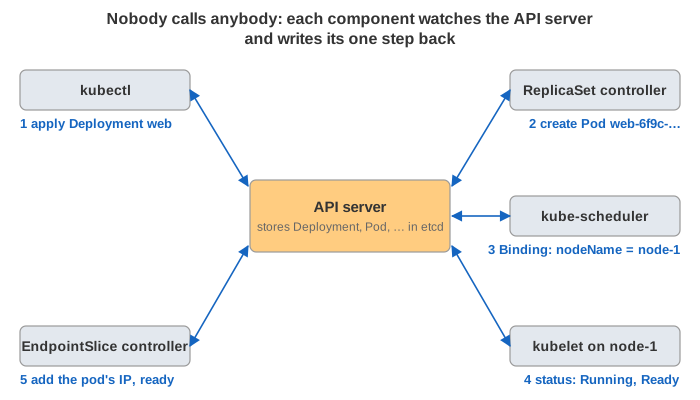
A pod is one or more containers that share a network namespace (one IP) and run together on one node. But in Kubernetes a pod is first of all an object in the API server, stored in etcd: a spec (what should run) and a status (what is running). No single program "runs" the pod. Several components each watch the API server, and each does one step when the object changes. Then it writes its result back to the API, where the next component sees it.
The canvas shows the control plane at the top: kubectl, the API server, the scheduler, the controller-manager
and the EndpointSlices. Below it are two nodes, each with 4 CPUs already partly used by other pods, a
kubelet and the container runtime containerd. On the right is the pod object,
as kubectl get pod -o yaml would print it. Under them are the pod phase and the app container's state as two small
state machines, then the live kubectl get pods table and the latest events. Every pod has one colour, used for its box on
the node, its table row and its events. The clock t counts seconds.
Who does what
| Component | Watches | Does |
|---|---|---|
| kubectl | — | sends your YAML to the API server (apply, delete, scale) |
| API server + etcd | — | validates and stores every object; serves the watches |
| Deployment / ReplicaSet / Job controller | its objects and their pods | creates and deletes pods so that the count matches the spec |
| kube-scheduler | pods with no nodeName | filters and scores the nodes, writes a Binding |
| kubelet (one per node) | pods bound to its node | drives the runtime over CRI, runs the probes, reports status |
| containerd + CNI plugin | — (called by the kubelet) | sandbox, network namespace and IP, image pulls, containers |
| EndpointSlice controller | pods and Services | lists each pod IP with ready / terminating |
| node lifecycle + taint-eviction controllers | node Leases | mark silent nodes Unknown, taint them, evict their pods |
Follow one healthy pod in Demo 1. kubectl creates a Deployment, and the ReplicaSet controller creates the pod. The scheduler binds it to a node. The kubelet makes the sandbox, runs the init container, pulls the image and starts the app. The probes pass, the pod becomes Ready, and the EndpointSlice lists it.
Phase, container states and conditions
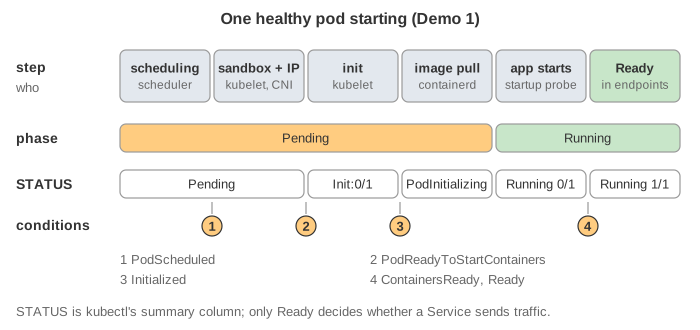
A pod's status has three layers. The phase is a coarse summary:
| Phase | Meaning |
|---|---|
Pending | accepted, but not every container has started: not scheduled yet, init containers running, image pulling |
Running | bound to a node, containers created, at least one is running, starting or restarting |
Succeeded | all containers exited 0 and will not be restarted |
Failed | all containers have ended and at least one failed |
Unknown | the pod's state could not be obtained, usually because its node cannot be reached |
Each container is Waiting (with a reason: ContainerCreating, PodInitializing,
ErrImagePull, ImagePullBackOff, CrashLoopBackOff), Running, or Terminated
(with a reason and an exit code: Completed 0, Error, OOMKilled 137). Its
lastState keeps the previous termination, so you can still see why it crashed after a restart.
The conditions are the milestones, each True or False with a time:
PodScheduled → PodReadyToStartContainers (sandbox and network ready) → Initialized (all
init containers done) → ContainersReady → Ready (also needs any readiness gates). Only Ready
decides whether a Service sends traffic to the pod.
The STATUS column of kubectl get pods is none of these. kubectl picks the most telling string:
Terminating if deletionTimestamp is set, Init:0/1 while init containers run, otherwise the
waiting or terminated reason of a container, otherwise the phase. So a crash-looping pod shows CrashLoopBackOff while its
phase is still Running (Demo 4).
Scheduling: filter, score, bind
The scheduler takes one pod without a node at a time. Filter plugins drop the nodes that cannot run it: not
enough free cpu or memory requests (the sum of the requests of the pods already there, not the actual use), taints the pod
does not tolerate, node selectors and affinity, ports. Score plugins rank the nodes that are left; the page uses only
"most free cpu" (LeastAllocated). The result is a Binding, which sets spec.nodeName. The
scheduler never contacts the node.
If no node passes, the pod stays Pending with PodScheduled=False, reason Unschedulable, and
an event such as 0/2 nodes are available: 2 Insufficient cpu. It waits in the unschedulable queue and is tried again when
something in the cluster changes, for example when another pod ends (Demo 2). In a real cluster a cluster autoscaler
would add a node at this point, or a higher-priority pod could preempt lower ones.
Starting: sandbox, init containers, image
The kubelet first asks the runtime for the pod sandbox (RunPodSandbox): a tiny
pause container that owns the network namespace. The CNI plugin connects it and gives the pod its IP (see
The Life of an HTTP Request in Kubernetes). Then the init containers run one after
another, each to completion, typically to wait for a dependency or prepare files. Then the app's image is pulled, unless it is
already on the node and imagePullPolicy is IfNotPresent.
If the pull fails (a typo in the tag, a private registry without credentials), the container waits with
ErrImagePull and then ImagePullBackOff. The kubelet retries after 10 s, 20 s, 40 s and so on, up to 5 minutes.
The phase stays Pending, because no container has ever run (Demo 3).
Probes: startup, readiness, liveness
The kubelet itself runs the probes, from the node: an HTTP GET, a TCP connect, a gRPC health check or a command in the container.
Each probe has periodSeconds, timeoutSeconds and failureThreshold. The three kinds do different
things when they fail:
| Probe | Question | When it fails failureThreshold times |
|---|---|---|
| startup | has the app finished booting? | container killed and restarted; until it passes, the other two do not run |
| readiness | can it serve requests right now? | Ready=False, removed from the Service's endpoints; not restarted |
| liveness | is the process stuck? | container killed (SIGTERM, then SIGKILL) and restarted |
The page uses startup every 2 s × 15 (a slow app gets 30 s), readiness every 5 s × 3 and liveness every 10 s × 3. When a database goes down, the readiness probe fails and the pod leaves the EndpointSlice. When the database is back, it rejoins without a restart (Demo 6). A deadlocked app fails both probes: first it stops getting traffic, then the liveness probe has it killed (Demo 7). A liveness probe that checks a dependency is a classic mistake: when the database is down, it restarts every pod and fixes nothing.
Restarts and CrashLoopBackOff
restartPolicy | Container exits 0 | Container exits ≠ 0 | Used by |
|---|---|---|---|
Always (default) | restart | restart | Deployments, StatefulSets, DaemonSets |
OnFailure | pod Succeeded | restart | Jobs |
Never | pod Succeeded | pod Failed | Jobs, one-off pods |
A restart happens inside the same pod: same name, same node, same IP. Only restartCount goes up. The
kubelet waits before each restart, and the wait doubles: 10 s, 20 s, 40 s, 80 s … up to 300 s. It goes back to 10 s after the
container has run fine for 10 minutes. During the wait the container is Waiting with reason
CrashLoopBackOff (Demo 4). The exit code tells you why it stopped: 1 is the program's own error, 137 is
128 + 9 (SIGKILL), 143 is 128 + 15 (SIGTERM). OOMKilled means the kernel killed the process because it went over its
limits.memory, a cgroup limit (Demo 5). The kubelet is only the messenger.
A controller makes a new pod only when a pod is deleted or evicted. A crash-looping pod is not replaced: the ReplicaSet sees one pod, as the spec wants.
Termination: preStop, SIGTERM, grace period, SIGKILL
kubectl delete pod does not remove the object. It sets metadata.deletionTimestamp with a grace period
(terminationGracePeriodSeconds, default 30 s). From that moment two things run in parallel:
- The EndpointSlice controller marks the endpoint
terminatingand not ready, and every kube-proxy and load balancer removes it. This takes a moment to reach every node. - The kubelet runs the
preStophook, then sends SIGTERM to PID 1 of each container. If a container is still running when the grace period (counted from the delete, preStop included) ends, it gets SIGKILL.
Because of this race, an app that exits at once on SIGTERM can still get new requests and refuse them. A short
preStop: sleep gives the endpoint removal time to spread (Demo 8). An app that ignores SIGTERM, often because it
runs under a shell that does not forward signals, is always killed hard after the full grace period (Demo 9). When every
container has stopped, the kubelet removes the sandbox and deletes the object with grace 0. Since Kubernetes 1.27 the pod first gets a
final phase: Succeeded if every container exited 0, otherwise Failed.
The ReplicaSet does not wait for any of this. It counts only pods that are not terminating, so the replacement is created and scheduled while the old pod is still shutting down. For a moment both exist.
When the node disappears
Each kubelet renews a Lease object every 10 s. If a node goes silent (power, network, a frozen kubelet), the
control plane waits node-monitor-grace-period (50 s; it was 40 s before Kubernetes 1.32), then sets the node's condition
Ready=Unknown. It also adds the taints node.kubernetes.io/unreachable with effect NoSchedule and
NoExecute. The pods on that node get Ready=False and leave their Services. Their phase still says
Running, because that is the kubelet's last report.
Every pod has a default toleration for this taint with tolerationSeconds: 300. When those 5 minutes run out, the
taint-eviction controller deletes the pod and its ReplicaSet makes a replacement on a healthy node. The old object stays
Terminating: only its own kubelet can confirm the containers stopped. When the node comes back, the kubelet sees the
deletion, kills the containers and the object disappears (Demo 10). Until then, a partitioned node may still be running the old
containers. That is why StatefulSets never start the replacement while the old pod object exists.
Pods that finish: Jobs
A Job's pods use restartPolicy: Never or OnFailure. With Never, a container that exits 0 makes
the pod Succeeded (STATUS Completed), and one that exits 1 makes it Failed (STATUS Error).
Both phases are final, and the pod no longer counts against the node's cpu (Demo 11). The Job controller then decides: count
a success, or make a new pod until backoffLimit failures (the page uses backoffLimit: 0). Finished pods stay in
the API so their logs can be read, until the Job is deleted or ttlSecondsAfterFinished cleans them up.
See also The Life of an HTTP Request in Kubernetes (what happens to traffic once the pod is Ready) and How a Program Is Loaded and Run (what starting a process means inside the container).
What the page leaves out
QoS classes and eviction under node memory or disk pressure, priority and preemption, sidecar containers (init containers with
restartPolicy: Always), ephemeral debug containers, readiness gates, PodDisruptionBudgets and kubectl drain,
in-place resize of cpu and memory, static pods, postStart hooks, real timings (the scheduler and the kubelet react in milliseconds, not
in whole seconds), and the probes that keep running in the background while the pod is healthy. The page also simplifies the Deployment:
each kind of pod has its own Deployment and ReplicaSet, and there are no rolling updates.