The idea: one operation, two different shapes
In NumPy, A + B and A * B work element by element: cell [i, j] of the result C is A[i, j] + B[i, j]. That needs one value of A and one value of B for every cell of C. When A and B have the same shape, that is easy. When they don't, NumPy uses broadcasting: it reuses the values of the smaller array along the axes where it has size 1, without copying anything.
The canvas has three panels. Shape check runs the rule on the two shapes. Arrays shows A, B and C as grids; light cells are values that are reused, not stored. Memory shows the numbers that really exist, with their strides: how many bytes to move for one step along each axis. Press Check Shapes, Stretch and Compute, or run a demo.
The rule, step by step
- Write the two shapes one under the other, lined up on the right. The last axis of A meets the last axis of B.
- If one shape is shorter, add 1s on its left: (4,) is read as (1, 4), a scalar () as (1, 1).
- Compare each axis. The sizes fit if they are equal or if one of them is 1. The result gets the larger size.
- If any axis does not fit, NumPy raises
ValueError: operands could not be broadcast together with shapes (3,4) (3,)and computes nothing.
| A | B | lined up | result |
|---|---|---|---|
| (3, 4) | () scalar | (3, 4) / (1, 1) | (3, 4) |
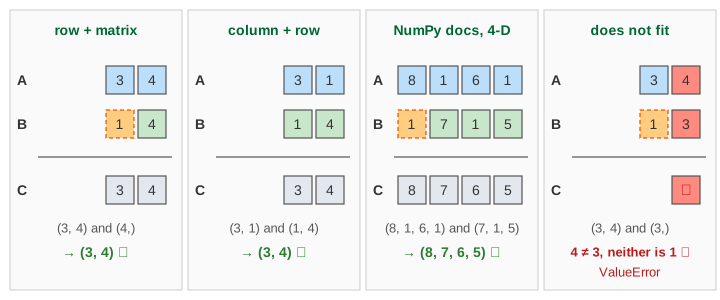
| (3, 4) | (4,) | (3, 4) / (1, 4) | (3, 4) |
| (3, 4) | (3, 1) | (3, 4) / (3, 1) | (3, 4) |
| (3, 1) | (1, 4) | (3, 1) / (1, 4) | (3, 4) |
| (3, 4) | (3,) | (3, 4) / (1, 3) | error: 4 vs 3 |
Only the shapes matter, never the values. Line-up is always from the right: NumPy never tries to match (3,) with the first axis of (3, 4), even though the 3s look like they belong together.
Scalar, row, column, both
A size-1 axis is stretched: its one value is used for every position along that axis.
- Scalar:
M * 10uses the single 10 for all 12 cells: C goes 10, 20, …, 120 (Demo 1: scalar times a matrix). - Row:
M + [10, 20, 30, 40]adds the same row to every row. Row 0 of C is 11, 22, 33, 44 and C[2, 3] = 12 + 40 = 52 (Demo 2). - Column:
M + [[100], [200], [300]]adds 100 to row 0, 200 to row 1, 300 to row 2. Row 0 of C is 101 … 104 and C[2, 3] = 312 (Demo 3). - Both: a (3, 1) column plus a (1, 4) row. Each is stretched along its size-1 axis, and the result is a full 3 × 4 table: C[i, j] = 100·(i + 1) + (j + 1), from 101 to 304 (Demo 4: (3, 1) + (1, 4) gives (3, 4)). Seven stored numbers make twelve.
The same rule works for any number of axes. The NumPy manual's example: (8, 1, 6, 1) and (7, 1, 5) give (8, 7, 6, 5).
When it fails, and the [:, None] fix
A (3, 4) matrix plus a vector of 3 values fails: the last axes are 4 and 3 (Demo 5: (3, 4) + (3,) does not fit). If you meant "one value per row", turn the vector into a column first: v[:, None] (the same as v[:, np.newaxis] or v.reshape(3, 1)) has shape (3, 1), and (3, 4) + (3, 1) works (Demo 6: the fix, v[:, None]).
The same trick gives an outer operation of two vectors. (4,) + (3,) fails, but (4,) + (3, 1) lines up as (1, 4) + (3, 1) and gives a (3, 4) table of every pair: C[i, j] = r[j] + v[i], up to 40 + 300 = 340 (Demo 7: outer sum of two vectors).
The quiet trap is the opposite: when the shapes happen to fit but you meant something else. (3,) + (3, 1) does not fail; it gives a (3, 3) table where you may have wanted 3 numbers. Check .shape when a result is bigger than you expected.
No copy: stride 0
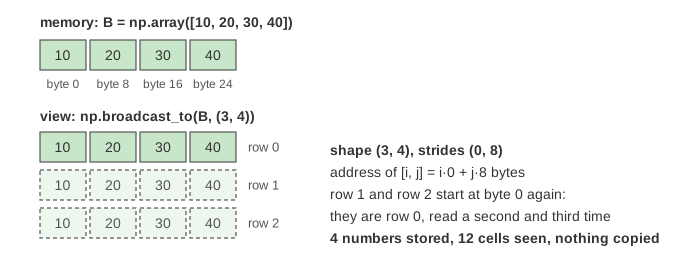
A NumPy array is a block of memory plus a shape and strides. For an int64 (3, 4) array the strides are (32, 8): one step down a row skips 4 numbers of 8 bytes, one step along a row skips 8 bytes. Broadcasting does not copy the smaller array. It reads it through a view whose stride is 0 on each stretched axis, so moving along that axis stays on the same number.
| operand | own shape and strides | view as (3, 4) |
|---|---|---|
| scalar 10 | () () | strides (0, 0) |
| [10, 20, 30, 40] | (4,) (8,) | strides (0, 8) |
| [[100], [200], [300]] | (3, 1) (8, 8) | strides (8, 0) |
| v[:, None] | (3, 1) (8, 0) | strides (8, 0) |
Only the result C is a new array: 12 numbers, 96 bytes. np.tile or np.repeat would build the stretched copies for real and give the same C, with more memory and more work. The memory panel shows the stored buffers next to the view strides after Stretch.
A copy of a whole array and a view that shares its memory are the same distinction as passing by value or by reference: see Pass by Value vs Pass by Reference.
Where you meet it
- Centering data:
X - X.mean(axis=0)subtracts each column's mean, a (n, d) minus a (d,) row. - A neural network layer: the bias b is one row added to every example of a batch,
X @ W + b. See Neural Network: the Forward Pass. - All pairwise distances:
P[:, None, :] - Q[None, :, :]gives an (n, m, d) array of differences.
Broadcasting is element-wise. It is not the matrix product A @ B, whose shape rule is (m × n)·(n × p) = m × p: see Matrix Multiplication. The same "reuse one small set of numbers everywhere" idea is what a convolution kernel does, in Convolution in a CNN.
See also Pandas GroupBy, where transform broadcasts one value per group back onto every row of a DataFrame.
See also NumPy Views and Strides for how slicing, transpose and reshape change the strides of one buffer, and when NumPy makes a copy instead.
What the page leaves out
Arrays with more than 2 axes on the canvas (the rule is the same); dtype promotion when int and float arrays meet; in-place operations such as A += B, where the result must already have A's shape; np.broadcast_arrays and the read-only flag of broadcast views; how NumPy loops over the result in C code; and the memory cost of a large result (an outer operation of two vectors of a million values is a million-by-million array).