Changing coordinate spaces
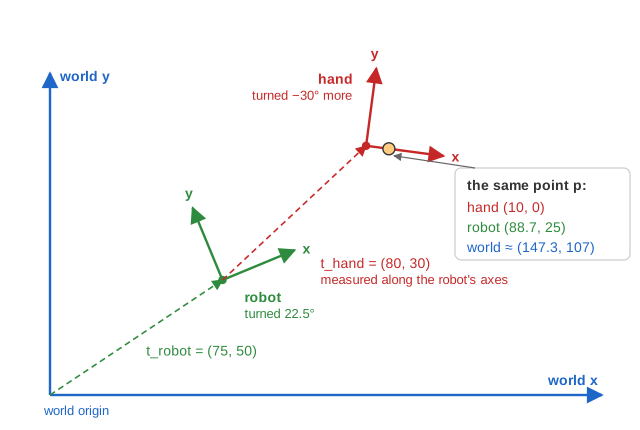
The same point has different coordinates depending on who is measuring. This page has three coordinate spaces (frames), each drawn with its own axes: world space (blue), robot space (green), attached to the robot's body, and hand space (red), attached to the robot's hand. The hand is described relative to the robot, and the robot relative to the world. That is how real systems are built: the hand designer does not need to know where the robot is standing.
A child frame is described inside its parent by two things, which the page shows as separate matrices: an orientation R, a 2×2 rotation matrix, and a position t, the child's origin measured in the parent's coordinates.
The formulas, in the page's convention
With Row Major (the default, used here) points are row vectors and multiply on the left of the matrix. With Column Major they are column vectors on the right and every matrix is transposed; the arithmetic is otherwise identical.
Rotation by θ (row vectors):   R(θ) = [  cos θ  sin θ ]
                                  [ -sin θ  cos θ ]

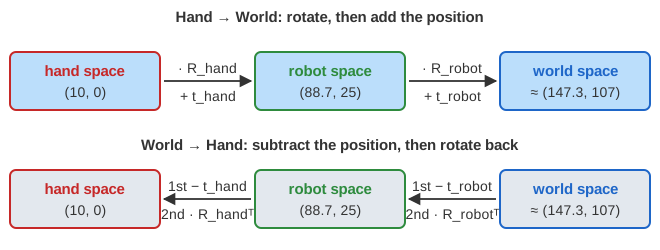
Child -> parent ("Hand Space -> World Space"): rotate, then add the position
    p_parent = p_child . R + t

Parent -> child ("World Space -> Hand Space"): subtract the position, then rotate back
    p_child  = (p_parent - t) . R^T

Hand -> world goes through the robot:
    p_robot = p_hand  . R_hand  + t_hand
    p_world = p_robot . R_robot + t_robot
World -> hand undoes the ROBOT step first:
    p_robot = (p_world - t_robot) . R_robot^T
    p_hand  = (p_robot - t_hand)  . R_hand^T

Column vectors (Column Major):  p_parent = R^T . p_child + t,   p_child = R . (p_parent - t)
When you choose "World Space → Hand Space" the page animates exactly this: each orientation matrix is transposed, each position is negated, and the position now comes before the matrix, because the subtraction must happen first.
The same thing as one matrix
With homogeneous coordinates (x, y, 1), "rotate by R, then add t" is one 3×3 matrix, and a chain of frames is a product of matrices, read left to right with row vectors:
M = [ R    0 ]     (R is 2x2, t is the 1x2 bottom row)
    [ t    1 ]

M_hand->world = M_hand . M_robot           (hand step first)
M_world->hand = M_robot^-1 . M_hand^-1     (inverse of a product reverses the order)
M^-1 = [   R^T      0 ]
       [ -t . R^T   1 ]
Worked example with the page's values
In the starting position the robot is turned by 22.5° and stands at (75, 50) in the world; the hand is turned by −30° and sits at (80, 30) in robot space. The page rounds matrix entries to three decimals:
R_robot = [  0.924  0.383 ]   t_robot = (75, 50)      R_hand = [ 0.866  -0.5   ]   t_hand = (80, 30)
          [ -0.383  0.924 ]                                    [ 0.5     0.866 ]
Enter x = 10, y = 0 with "Hand Space → World Space":
Hand -> robot:
  [10 0] . R_hand = [ 10·0.866 + 0·0.5,  10·(-0.5) + 0·0.866 ] = [ 8.66  -5 ]
  + t_hand        = [ 8.66 + 80,  -5 + 30 ]                     = [ 88.66  25 ]

Robot -> world:
  [88.66 25] . R_robot = [ 88.66·0.924 + 25·(-0.383),  88.66·0.383 + 25·0.924 ]
                       = [ 81.922 - 9.575,  33.957 + 23.1 ]    = [ 72.347  57.057 ]
  + t_robot            = [ 147.347  107.057 ]
Now switch to "World Space → Hand Space" and enter that world point, (147.347, 107.057):
World -> robot:
  [147.347 107.057] - t_robot = [ 72.347  57.057 ]
  . R_robot^T  (R_robot^T = [ 0.924 -0.383 ; 0.383 0.924 ])
      = [ 72.347·0.924 + 57.057·0.383,  72.347·(-0.383) + 57.057·0.924 ] = [ 88.701  25.012 ]

Robot -> hand:
  [88.701 25.012] - t_hand = [ 8.701  -4.988 ]
  . R_hand^T  (R_hand^T = [ 0.866 0.5 ; -0.5 0.866 ])
      = [ 8.701·0.866 + (-4.988)·(-0.5),  8.701·0.5 + (-4.988)·0.866 ] = [ 10.029  0.031 ]
We are back at the hand point, up to rounding: (10.029, 0.031) instead of (10, 0). The error comes from the three-decimal entries: 0.9242 + 0.3832 = 1.000465, so the rounded matrix is not exactly a rotation and its transpose is not exactly its inverse. With exact values the forward result is (147.344, 107.026) and the round trip returns exactly (10, 0).
As one matrix, the rotation part is Rhand · Rrobot = R(−30° + 22.5°) = R(−7.5°) (in 2D, rotation angles simply add), and the bottom row is where the hand's origin lands in the world, thand · Rrobot + trobot = (137.430, 108.331):
M_hand->world = [ 0.9914   -0.1305   0 ]      [10 0 1] . M = [ 9.914 + 137.430,  -1.305 + 108.331,  1 ]
                [ 0.1305    0.9914   0 ]                   = [ 147.344  107.026  1 ]
                [ 137.430  108.331   1 ]
Why it works
The rows of Rhand are the hand's x and y axes written in robot coordinates, and thand is the hand's origin in robot coordinates. So p · R + t = t + x·(hand x axis) + y·(hand y axis): start at the hand's origin and walk x steps along its x axis and y steps along its y axis. That is literally what "the point (x, y) in hand space" means.
Going the other way, the offset p − t must be split into "how far along each axis". Because the axes are perpendicular unit vectors, that is just a dot product with each axis, and doing both dot products at once is multiplication by RT. Equivalently, R · RT = I, so the inverse of a rotation is its transpose. Changing frames therefore always uses the inverse of the transform that places the frame, and for rotations plus translations that inverse is cheap.
Cost and practical notes
Each step costs one 2×2 multiplication and one addition. Programs that convert many points multiply the frame matrices once (Mhand · Mrobot) and apply the single result to every point. Scene graphs store each object's local-to-parent matrix and cache the product along the path to the root; when the robot moves, only its own matrix changes and the hand follows automatically. Because the inverse needs only a transpose and a subtraction, no general matrix inversion is needed. In 3D the same idea uses 4×4 matrices, and a camera's view matrix is the world-to-camera inverse of the matrix that places the camera.
Common mistakes
- Wrong order in the chain. Hand → world applies the hand step first; world → hand must undo the robot step first. Mixing them gives nonsense.
- Rotating before subtracting. The inverse is (p − t) · RT, not p · RT − t.
- Using R instead of RT. That turns the point by the frame's angle a second time instead of undoing it.
- Measuring t in the wrong frame. thand is in robot coordinates, not world coordinates.
- Transpose only works for pure rotations. If a frame is also scaled, RT is no longer the inverse.
- Row vs column convention. With column vectors the orientation matrix is the transpose and multiplies on the left; the "Column Major" option shows this.
- Degrees vs radians, and rounding. Code needs radians; and as the example shows, rounded matrices make round trips slightly inexact.
Where it is used
Robot arms compute where the gripper is (forward kinematics) by chaining one frame per joint, and robotics software such as ROS keeps a tree of frames for exactly this. Games attach a sword to a hand bone and a camera to a car; skeletal animation chains bone frames; graphics converts model → world → camera space for every vertex. Nested SVG <g transform> groups and nested CSS transforms are the same idea: every element is drawn in its parent's coordinate space.