Rotation and scaling in 2D
A linear transformation moves every point (x, y) to a new point whose coordinates are fixed combinations of the old ones, such as x′ = ax + cy and y′ = bx + dy. The four numbers a, b, c, d fit in a 2×2 matrix, and applying the transformation is a matrix multiplication. Rotation about the origin and scaling about the origin are both linear: the origin stays put and straight lines stay straight. That is why the page only transforms the corners of the shape and then redraws the edges between them.
Row vectors or column vectors
There are two ways to write the same multiplication, and this page lets you switch between them. With Row Major (the default, used in this section) the point is a row vector on the left: p′ = p · M. With Column Major it is a column vector on the right: p′ = M · p. The matrices of the two conventions are transposes of each other (rows and columns swapped), which is exactly what the page shows when you switch.
Row vectors (page default)            Column vectors
[x' y'] = [x y] . M                   [x']         [x]
                                      [y'] = M^T . [y]

Rotation by θ (counter-clockwise when +y is up):
R = [  cos θ   sin θ ]               R^T = [ cos θ  -sin θ ]
    [ -sin θ   cos θ ]                     [ sin θ   cos θ ]

Scaling by sx along x and sy along y (the same in both conventions):
S = [ sx   0 ]
    [  0  sy ]

Multiplied out:  [x y] . R = [ x cos θ - y sin θ,   x sin θ + y cos θ ]
                 [x y] . S = [ sx x,  sy y ]
Composing transformations, and why order matters
To rotate and then scale, multiply by R and then by S. With row vectors, (p · R) · S = p · (R · S), so the matrices are read left to right in the order they happen. With column vectors, S · (R · p) = (S · R) · p, so they are read right to left. That is why, for "Rotate, then scale", the page shows [x y] [rotation] [scale] in row mode but [scale] [rotation] [x y] in column mode.
The page follows the same procedure a graphics program would:
1. Build R from the angle (degrees -> radians: θ × π / 180) and S from Scale X, Scale Y.
2. Multiply the two matrices once:  M = R . S   (rotate first; row vectors)
                                    M = S . R   (scale first;  row vectors)
3. For every vertex p of the shape:  p' = p . M
4. Redraw the edges between the new vertices.
Matrix multiplication is associative, which is what makes step 2 legal, but it is not commutative: in general R · S ≠ S · R. They are equal only in special cases, for example a uniform scale (sx = sy) or a rotation by a multiple of 180°.
Worked example
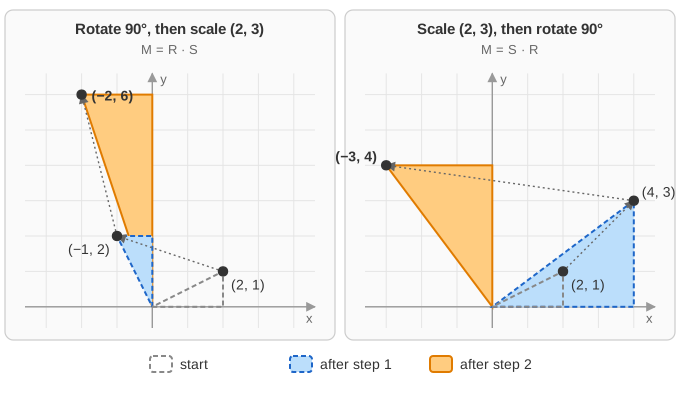
Rotate the point (2, 1) by 90° and then scale by (2, 3). Since cos 90° = 0 and sin 90° = 1:
R = [  0  1 ]        S = [ 2  0 ]
    [ -1  0 ]            [ 0  3 ]

Step 1, rotate:  [2 1] . R = [ 2·0 + 1·(-1),  2·1 + 1·0 ] = [ -1  2 ]
Step 2, scale:   [-1 2] . S = [ -1·2 + 2·0,  -1·0 + 2·3 ] = [ -2  6 ]

As one matrix:   R . S = [ 0·2 + 1·0     0·0 + 1·3 ] = [  0  3 ]
                         [ -1·2 + 0·0   -1·0 + 0·3 ]   [ -2  0 ]
                 [2 1] . (R . S) = [ 2·0 + 1·(-2),  2·3 + 1·0 ] = [ -2  6 ]    (same answer)

Other order, scale then rotate:
                 S . R = [  0  2 ]        [2 1] . (S . R) = [ -3  4 ]
                         [ -3  0 ]
Check by hand:   scale (2, 1) -> (4, 3), then rotate 90 degrees -> (-3, 4)

Column form of the first order:  R^T . (2, 1) = (-1, 2),   S . (-1, 2) = (-2, 6)
The two orders give (−2, 6) and (−3, 4). After a 90° rotation the point's old x part points along y, so "scale y by 3" stretches a different part of the point than it would before the rotation. To see the same thing on the page, enter Rotation Angle 90, Scale X 2, Scale Y 3 with the square: its corner (100, 100) goes to (−200, 300) with "Rotate, then scale" and to (−300, 200) with "Scale, then rotate". Each press of Transform applies to the shape as it is now, so presses build up.
Why it works
Multiply the unit vectors by a matrix and you get its rows: [1 0] · M is the first row and [0 1] · M is the second. Any point is x·[1 0] + y·[0 1], and a linear map keeps such sums, so p · M = x·(row 1) + y·(row 2). In the row convention the rows of the matrix are where the x and y axes go; in the column convention the columns are, which is why the two matrices are transposes. For R the rows are (cos θ, sin θ) and (−sin θ, cos θ): the x axis turned by θ and the y axis turned by θ, both still of length 1 and still perpendicular.
Because its rows are perpendicular unit vectors, a rotation matrix is orthogonal: R · RT = I, so the inverse of a rotation is its transpose, R−1 = RT = R(−θ). The inverse of a scale is diag(1/sx, 1/sy), which exists only when neither factor is 0. The inverse of a product reverses the order: (R · S)−1 = S−1 · R−1 (to undo "rotate, then scale", unscale first). The determinant tells how areas change: det R = 1 and det S = sx·sy; a negative determinant, such as Scale X = −1, means the shape is mirrored.
![Left: the unit square with axis vectors [1 0] in red and [0 1] in green. Right: after multiplying by the 30 degree rotation matrix, the red vector becomes row 1 = (0.866, 0.5) and the green vector becomes row 2 = (-0.5, 0.866), and the square turns with them](Images/rotatescale2d/axes.svg)
Cost and practical notes
A 2×2 matrix times a vector is 4 multiplications; a 2×2 matrix times a matrix is 8. Applying k transformations to n points one at a time costs 4kn multiplications, while multiplying the matrices together first costs 8(k − 1) + 4n. For a model with thousands of vertices the combined matrix is far cheaper, which is why the page (and every graphics engine) multiplies the matrices first. Rotation and scaling alone never move the origin; translation cannot be written as a 2×2 matrix at all, so real systems use 3×3 matrices in 2D and 4×4 matrices in 3D with homogeneous coordinates (see the Rotation and Translation page). A GPU combines an object's model, view and projection matrices into one 4×4 matrix and applies it to every vertex.
Common mistakes
- Order of multiplication. Row vectors: first transformation on the left. Column vectors: first transformation on the right. Swapping them gives the "Scale, then rotate" result instead.
- Mixing conventions. A rotation matrix copied from a column-vector book into row-vector code is the transpose, which for a rotation is the inverse: the shape turns the wrong way.
- Degrees vs radians. The page takes degrees, but
Math.cosexpects radians.Math.cos(90)is about −0.448, not 0; useMath.cos(90 * Math.PI / 180). - Rotating about the origin, not the shape's centre. These shapes are centred on the origin, so they spin in place. A shape centred elsewhere would swing around the origin. To rotate about a point c: translate by −c, rotate, translate back by +c.
- +y up vs +y down. On screens y usually grows downward, so the same matrix looks clockwise. The "+y Down" option shows this: the numbers are identical, only the drawing flips.
- Non-uniform scaling distorts normals. Scale by (2, 1): the direction (1, 1) becomes (2, 1), but its perpendicular (1, −1) becomes (2, −1), and (2, 1)·(2, −1) = 3 ≠ 0, no longer perpendicular. Normals must use the inverse transpose, here diag(1/2, 1): (1, −1) → (0.5, −1), which is perpendicular to (2, 1) again.
- Rounding. The page shows three decimals, so cos 30° appears as 0.866; after many presses small errors add up.
Where it is used
Every 2D and 3D graphics pipeline, sprite engines in games, image editors that rotate or resize pictures, and map software. In CSS, transform: rotate(90deg) scale(2, 3) multiplies the matrices in the listed order for column vectors, so the rightmost function (the scale) is applied to the element first, and because screen y points down, positive angles turn clockwise. SVG's transform attribute and the Canvas 2D ctx.rotate/ctx.scale calls work the same way.