Rotation and translation in 2D
Rotation about the origin is a linear map, so it fits in a 2×2 matrix. Translation, p′ = p + t, is not linear: it moves the origin, and any 2×2 matrix sends (0, 0) to (0, 0). The standard fix is homogeneous coordinates: write the point as (x, y, 1) and use 3×3 matrices. The extra 1 gives the matrix a place to add a constant, so rotation, translation and any mix of the two become a single matrix multiplication.
The page's convention
With Row Major selected (the default, used here) the point is a row vector on the left, p′ = p · M, and the translation sits in the bottom row. With Column Major the point is a column vector on the right, p′ = M · p, the matrix is transposed and the translation sits in the right column. Each press of Transform builds one matrix that rotates by θ about the origin and then translates by (Δx, Δy):
Row vectors (page default)                   Column vectors

R = [  cos θ  sin θ  0 ]    T = [ 1   0   0 ]
    [ -sin θ  cos θ  0 ]        [ 0   1   0 ]
    [   0      0    1 ]        [ Δx  Δy  1 ]

D = R . T = [  cos θ  sin θ  0 ]           D^T = [ cos θ  -sin θ  Δx ]
            [ -sin θ  cos θ  0 ]                 [ sin θ   cos θ  Δy ]
            [   Δx     Δy   1 ]                 [   0       0     1 ]

[x y 1] . D = [ x cos θ - y sin θ + Δx,   x sin θ + y cos θ + Δy,   1 ]
The page keeps two copies of the shape. The black Local Space shape never changes: it is the object's own description, centred on its own origin. The green World Space shape is the local shape multiplied by the current transform M, the 3×3 matrix shown at the top left, which starts as the identity. Each press does:
1. Build D from the angle (degrees -> radians) and (Δx, Δy).
2. Update the current transform:  M = M . D     (row vectors)
                                  M = D . M     (column vectors)
   Either way the new step happens AFTER everything already in M,
   and is measured along the world axes.
3. For every local vertex p:  world vertex = [x y 1] . M
Worked example
Take the point (2, 1), written [2 1 1]. With θ = 90°, cos θ = 0 and sin θ = 1.
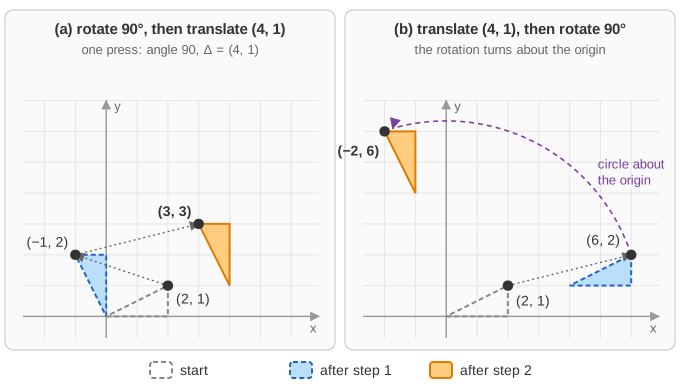
(a) One press: angle 90, translate (4, 1).
    D = [  0  1  0 ]      [2 1 1] . D = [ 2·0 + 1·(-1) + 4,  2·1 + 1·0 + 1,  1 ] = [ 3  3  1 ]
        [ -1  0  0 ]
        [  4  1  1 ]      Rotate (2, 1) -> (-1, 2), then add (4, 1) -> (3, 3).

(b) Two presses: first angle 0, translate (4, 1); then angle 90, translate (0, 0).
    M = T(4,1) . R(90) = [ 1 0 0 ]   [  0 1 0 ]   [  0  1  0 ]
                         [ 0 1 0 ] . [ -1 0 0 ] = [ -1  0  0 ]
                         [ 4 1 1 ]   [  0 0 1 ]   [ -1  4  1 ]
    bottom row: [4 1 1] . R = [ 4·0 + 1·(-1),  4·1 + 1·0,  1 ] = [ -1  4  1 ]
    [2 1 1] . M = [ 2·0 + 1·(-1) + (-1),  2·1 + 1·0 + 4,  1 ] = [ -2  6  1 ]
    Translate (2, 1) -> (6, 2), then rotate about the ORIGIN -> (-2, 6).

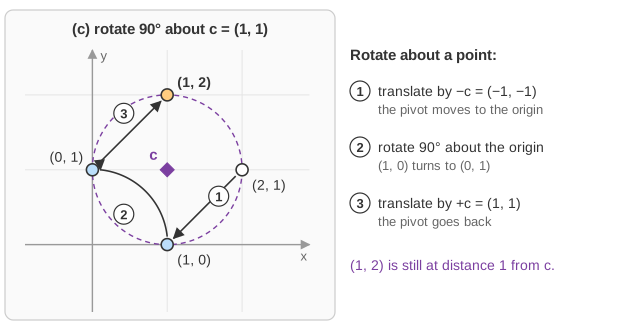
(c) Rotate 90 degrees about the pivot c = (1, 1):
    press 1: angle 0,  translate (-1, -1)     (move the pivot to the origin)
    press 2: angle 90, translate (1, 1)       (rotate, then move the pivot back)
    M = T(-1,-1) . R(90) . T(1,1) = [  0  1  0 ]
                                    [ -1  0  0 ]
                                    [  2  0  1 ]
    [2 1 1] . M = [ 2·0 + 1·(-1) + 2,  2·1 + 1·0 + 0,  1 ] = [ 1  2  1 ]
    Check: (2,1) - (1,1) = (1,0);  rotate -> (0,1);  + (1,1) = (1,2).
The same two ingredients, a 90° turn and a move by (4, 1), give (3, 3) in one order and (−2, 6) in the other. In (b) the rotation happens after the point has been moved away from the origin, so it swings around the origin on a circle of radius √40. Example (c) is the standard recipe for rotating about any point: the result (1, 2) is still at distance 1 from the pivot. You can reproduce (a) and (b) on the page with the square: its corner (100, 100) goes to (−96, 101) with one press of (90, 4, 1) and to (−101, 104) with the two presses of (b).
Why it works
Multiply the three special vectors by M: [1 0 0] · M is the first row, [0 1 0] · M the second and [0 0 1] · M the third. So, in the row convention, the first two rows are where the local x and y axes point in world space, and the bottom row is where the local origin lands. After any number of presses you can read the object's pose straight off the matrix. The third coordinate w decides whether the bottom row is used: points have w = 1 and get translated; directions such as velocities or edge vectors have w = 0 and only get rotated, which is exactly right, since moving an object does not change which way an arrow points.
A rotation followed by a translation is a rigid motion: lengths and angles are preserved. Its inverse is easy because the inverse of a rotation is its transpose. If p′ = p · R + t, then p = (p′ − t) · RT: undo the steps in reverse order. For example (a) the inverse matrix is T(−4, −1) · R(90)T, and [3 3 1] times it gives back [2 1 1].
inverse of D:  [ 0  -1  0 ]        [3 3 1] . D^-1 = [ 3·0 + 3·1 - 1,  3·(-1) + 3·0 + 4,  1 ] = [ 2  1  1 ]
               [ 1   0  0 ]
               [-1   4  1 ]
Cost and practical notes
A 3×3 matrix times a point is 9 multiplications (6 if you skip the known 0s and 1), and a 3×3 product is 27. The page keeps only one current matrix, so no matter how many presses you make, each vertex needs one multiplication by M; transforming the vertices step by step would cost one multiplication per press per vertex. The same idea in 3D uses 4×4 matrices with points (x, y, z, 1); a graphics pipeline multiplies model, view and projection matrices together once per object and the GPU applies the result to millions of vertices. Also note that "row-major/column-major" also names how a matrix is stored in memory; that is a separate question from whether vectors are rows or columns, and graphics APIs differ on both.
Common mistakes
- Order. "Rotate then translate" and "translate then rotate" are different motions, as (a) and (b) show. With row vectors the first step is the leftmost matrix; with column vectors it is the rightmost.
- Rotating about the origin instead of a point. A rotation matrix always turns about the origin. To spin an object in place, translate its centre to the origin, rotate, and translate back, as in (c).
- Translation in the wrong place. Row vectors: bottom row. Column vectors: right column. Copying a matrix between conventions without transposing puts Δx, Δy where they do nothing useful.
- Forgetting the 1. Using w = 0 for a point silently drops the translation; using w = 1 for a direction wrongly translates it.
- Wrong inverse. The inverse of "rotate then translate" is "translate back, then rotate back", not p · RT − t.
- Degrees vs radians. The page takes degrees;
Math.sinandMath.coswant radians (θ × π / 180). - Drift. Multiplying many rounded matrices slowly makes the rotation part not quite orthogonal, so shapes shrink or skew; engines re-orthonormalise or rebuild the matrix from a stored angle and position.
Where it is used
Every object in a game or scene graph stores a position and rotation that become such a matrix. The Canvas 2D API (ctx.translate, ctx.rotate), CSS (transform: translate(40px, 10px) rotate(30deg)) and SVG (transform="translate(40 10) rotate(30)") all compose 3×3 homogeneous matrices; they use column vectors, so the rightmost function acts on the element first. Robots describe a pose on the floor by exactly this matrix (the group SE(2)), and map and CAD software use it to place, move and rotate drawings.