From a name to an address
Before a browser can open a connection to www.example.com it needs an IP address. On How an HTTP Connection Is Established that is one arrow, "DNS query, DNS answer". This page opens that arrow up. The first lookup of a name can take a few hundred milliseconds and involve four or five servers around the world; the second one usually costs nothing at all, because every answer is cached, at several places, for as long as its owner allows.
The canvas has three zones. On the left the laptop: the browser's host cache and the operating system's stub resolver cache. At the top right the recursive resolver's cache: the delegations it has learned (which name servers serve which zone, and their addresses) and the answers it holds, each with the TTL that is left. Below, a sequence diagram with time going down and one lifeline per party: browser, stub, resolver, and the three levels of the DNS hierarchy, root, TLD and authoritative. Several servers share the TLD and authoritative lifelines; each arrow names its server and the lifeline head shows the latest one. Grey arrows are the laptop's own messages, blue ones the resolver's queries, orange ones referrals, green ones authoritative answers, red ones NXDOMAIN or a lost packet. Under the diagram, the header and the four sections of the latest message, and a latency bar that adds up the round trips.
Names are a tree of zones
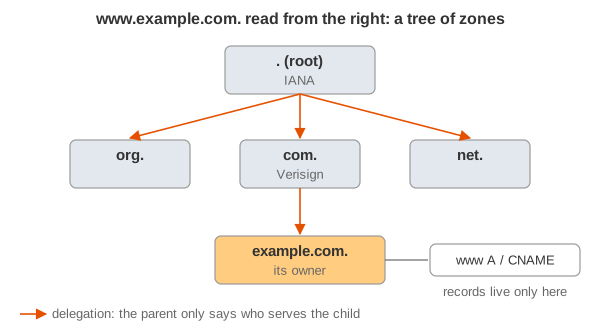
A DNS name is read from the right: www.example.com. is the node www under example under com under the root (the final, usually invisible dot). The tree is cut into zones, each run by whoever owns it: the root zone by IANA, com. by Verisign, example.com. by the company that registered it. A parent zone does not hold its children's data; it only says who does. That pointer is a delegation: NS records in the parent, "example.com. is served by ns1.example.com.". Following delegations from the root down is how any name can be found without any server knowing all names.
Who takes part
- Stub resolver: the small resolver in the operating system (
getaddrinfo()in libc, systemd-resolved on many Linux systems, the DNS client service on Windows). It cannot follow delegations; it sends one question to a configured recursive resolver and waits for the final answer. - Recursive resolver (also: caching resolver, full resolver): the one that does the work, run by your ISP, your company, or a public service (1.1.1.1, 8.8.8.8, 9.9.9.9). It is shared by many clients, so its cache is warm for popular names.
- Root servers: they serve the root zone, which holds only the delegations of the TLDs.
- TLD servers: they serve
com.,org.,de., … and hold the delegations of every registered domain in them. - Authoritative servers: they serve a zone's actual data (A, AAAA, MX, CNAME, …), run by the domain's owner or its DNS host. Only they answer with the AA (authoritative answer) flag.
The DNS message
Every query and every answer has the same format: a 12-byte header, then four sections. The header carries a 16-bit ID (the answer repeats the query's, so the asker can match them) and flags: QR (0 query, 1 response), RD (recursion desired, set by the asker), RA (recursion available, set by a server that does recursion), AA (authoritative answer) and the RCODE (NOERROR, NXDOMAIN, SERVFAIL, REFUSED, …). The sections:
- question: the name, the type (A, AAAA, MX, …) and the class (IN);
- answer: records that answer the question;
- authority: NS records of a referral, or the zone's SOA record with a negative answer;
- additional: extra records the asker will probably need, above all the addresses of the name servers in the authority section (glue).
The message detail row shows these for the latest arrow and highlights the section that carries the news: the authority and additional sections of a referral, the answer section of an answer.
Recursive and iterative queries
The stub sends a recursive query (RD = 1): "give me the final answer". The recursive resolver then sends iterative queries (RD = 0) down the tree: each server answers with what it knows. A server that does not have the data but knows who does answers with a referral: no answer section, the NS records of the next zone down in the authority section, their addresses in the additional section. The resolver caches the referral and asks one of the named servers. For a cold example.com: the root refers to com., the .com server refers to example.com., and ns1.example.com answers with AA = 1. Three round trips from the resolver plus the stub's own: 20 + 30 + 80 + 10 = 140 ms here (Demo 1).
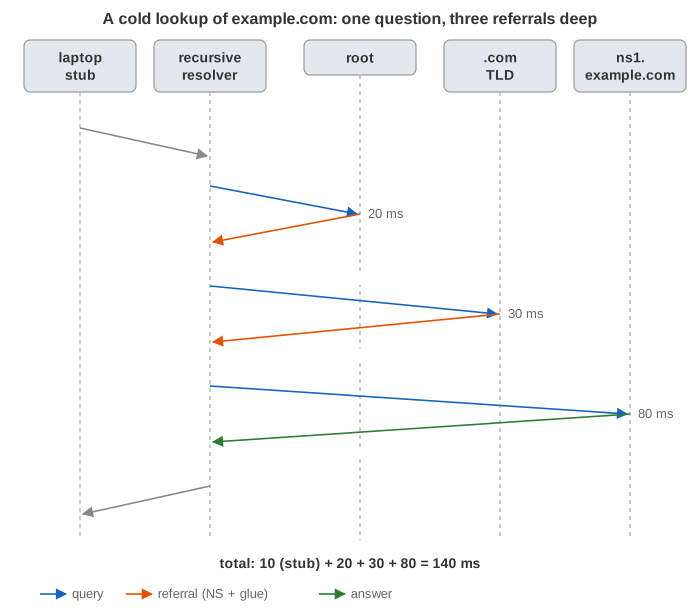
A textbook alternative is the recursive chain: the resolver asks the root with RD = 1, the root asks the .com server, which asks ns1.example.com, and the answer travels back the chain. With the page's delays it takes the same 140 ms, but every server on the way has to keep the query's state until the answer is back (the orange bars in Demo 7). A root server does this for nobody: it would need memory per query for millions of clients, and it would become a very effective amplifier for attackers. Real root and TLD servers answer every query with a referral and set RA = 0.
Referrals and glue
A referral names the next servers, but a name alone is not enough to send them a packet. If the name server's name lies inside the zone it serves (ns1.example.com for example.com.), the resolver could never find its address: to look up ns1.example.com it would have to ask ns1.example.com. So the parent zone also holds the address and sends it along in the additional section: that is glue. A server includes addresses only for names inside its own zone (in-bailiwick); it cannot vouch for others. example.org. on this page is served by ns1.dnshost.net, a name in .net, so the .org server sends no glue, and the resolver has to resolve ns1.dnshost.net first, a whole lookup of its own, before it can continue (Demo 6, bracketed in the diagram): 230 ms instead of 120. This is one reason DNS hosts that serve many zones are fast only when their own name is already cached.
The root servers
There are 13 root server names, a.root-servers.net to m.root-servers.net (13 because their addresses once had to fit into one 512-byte UDP answer), run by 12 organisations. Each name is an anycast address announced from hundreds of sites, so there are well over a thousand root server instances and the nearest one is usually a few milliseconds away. A resolver learns their addresses from a file shipped with it, the root hints, and at startup asks one of them for the current list (priming). After that it rarely talks to the root at all: the TLD delegations are cached for two days (172 800 s). Demo 4 shows how long it takes until even they expire.
Caching and TTLs
Every record carries a TTL (time to live) set by the zone's owner: how many seconds it may be cached. There are caches at three places on this page:
- the browser's host cache (Chrome used to keep entries for a fixed 60 s; the page caps the TTL at 60 s);
- the OS stub cache (systemd-resolved, macOS mDNSResponder, the Windows DNS client), which honours the TTL;
- the recursive resolver, which caches every record it receives, answers and referrals alike, and counts the TTL down: a record cached with 3600 s is handed out two minutes later with 3480. So the TTL a client sees is the time left, and no copy anywhere lives longer than the owner allowed.
This makes the second lookup cheap at every level (Demo 2): 0 ms from the browser, 0 ms from the OS, 10 ms from the resolver (one round trip from the laptop), and even a new name in a known zone skips the root and the TLD (Demo 3: www.example.com after example.com goes straight to ns1.example.com). Low TTLs are a trade-off: a CDN gives its records 60 s or less so it can move traffic between sites quickly, and pays for it with lookups that go all the way to its servers every minute (Demo 4: after two minutes only the CDN's A record has to be fetched again, 50 ms).
CNAME
A CNAME record says "this name is an alias, the canonical name is that one": www.example.com. CNAME www.example.com.edge.example.net. hands the site over to a CDN without giving the CDN control of example.com.. The resolver caches the CNAME and starts the resolution again with the target, often in another zone, so a cold lookup gets longer (Demo 3: after ns1.example.com's answer, back to the root for .net). A name with a CNAME may have no other records, which is why the zone apex (example.com. itself, which must have SOA and NS records) cannot be a CNAME; DNS hosts offer non-standard ALIAS / CNAME-flattening records, and the new HTTPS / SVCB records solve it properly.
NXDOMAIN and negative caching
If a name does not exist, its zone's authoritative server answers NXDOMAIN with the zone's SOA record in the authority section. Resolvers cache that too (RFC 2308), for min(the SOA record's TTL, the SOA's minimum field): 300 s for example.com. here. Without negative caching, a typo in a popular link or a misconfigured client asking for a missing name again and again would send every query to the authoritative servers (Demo 5: 90 ms the first time, 10 ms from the negative cache, 90 ms again after five minutes).
UDP, 512 bytes, EDNS and TCP
DNS mostly runs over UDP port 53: one packet out, one back, no handshake. UDP gives no delivery guarantee, so the resolver keeps a timer and, when no answer comes, asks another server of the same zone (Demo 8: the query to a.gtld-servers.net is lost, 400 ms later the resolver asks b.gtld-servers.net). Real resolvers adapt the timeout to each server's measured round-trip time and prefer the fastest servers. Classic DNS limited a UDP answer to 512 bytes; EDNS(0) lets the asker announce a larger buffer (1232 bytes is today's safe default). If an answer still does not fit, the server sets the TC (truncated) bit and the resolver asks again over TCP.
Spoofing, random IDs and ports, DNSSEC
A UDP answer is accepted if it comes from the right address and carries the right question and ID. An attacker who can guess the ID can race the real server and plant a false record in the resolver's cache, which then serves it to everyone. The Kaminsky attack (2008) made this practical: by asking for many random non-existent names under a zone, the attacker gets as many races as he likes, and a forged referral in any of them takes over the whole zone. The fix was to randomise the source port as well as the 16-bit ID, which makes a guess about 232 times less likely to hit. The page uses fixed, counting IDs and ports so that they are easy to follow.
DNSSEC solves the problem at its root: every zone signs its records (RRSIG records) with its key (DNSKEY), and the parent zone publishes a hash of the child's key (a DS record) signed with its own key, up to the root, whose key resolvers know. A validating resolver checks this chain of trust and throws away anything that does not verify. It protects integrity, not privacy.
Privacy: QNAME minimisation, DoT and DoH
On this page the resolver sends the full name to every server, so the root and the .com server learn that someone is looking up www.example.com. With QNAME minimisation (RFC 9156, on by default in current Unbound, BIND and the big public resolvers) the resolver asks the root only about com. and the .com server only about example.com.; the number of round trips is the same. The path between the laptop and the resolver is plain UDP that anyone on the network can read; DNS over TLS (port 853) and DNS over HTTPS encrypt it, and browsers can use DoH themselves, bypassing the OS stub.
/etc/hosts, search domains and ndots
Before asking DNS at all, getaddrinfo() consults /etc/hosts (the order is set in /etc/nsswitch.conf). A name without enough dots is first tried with the search domains from /etc/resolv.conf appended: with search corp.example and the default ndots:1, intranet becomes intranet.corp.example. Kubernetes sets ndots:5, so a lookup of api.example.com from a pod first tries several cluster suffixes, each an NXDOMAIN, before the real name: a common hidden cause of slow requests, cured by writing the name with a final dot.
What the page leaves out
Only A records are asked. A browser asks for A and AAAA (IPv6) in parallel and then races connections to both (Happy Eyeballs); it may also ask for the HTTPS record, which can tell it before connecting that the site speaks HTTP/3 (see HTTP/1.1 vs HTTP/2 vs HTTP/3). Each zone is drawn with one server (plus a second .com address for the loss demo); real zones have two or more and resolvers pick among them by measured RTT. .com and .net are indeed served by the same gtld-servers.net machines; the .org server's name is made up. Servers answer in 0 ms. On this page only the resolver caches negative answers. What the browser does with the address it gets is the subject of How an HTTP Connection Is Established.