The idea: one public address, many private hosts
There are only about 4 billion IPv4 addresses, far fewer than devices. So a home or an office gets one public address
from its ISP (here 203.0.113.7), and the devices inside use private addresses that are not routed on the
Internet: 10.0.0.0/8, 172.16.0.0/12 and 192.168.0.0/16 (RFC 1918). The router between them does
network address translation (NAT): it rewrites addresses in every packet that crosses it, and keeps a table so it can
undo the rewrite for the replies.
The canvas has three regions. On the left the private LAN with three hosts and their sockets. In the middle the home router: its NAT type, the port-forward rule, the translation table, and at the bottom the packet it is working on, with its header as it looks on the LAN side and on the WAN side (fields NAT rewrote are orange). On the right the Internet: servers, an outside host, and a peer that is itself behind another NAT. Each inside socket has its own colour, used by its packets and its table rows.
Going out: rewrite the source, remember it
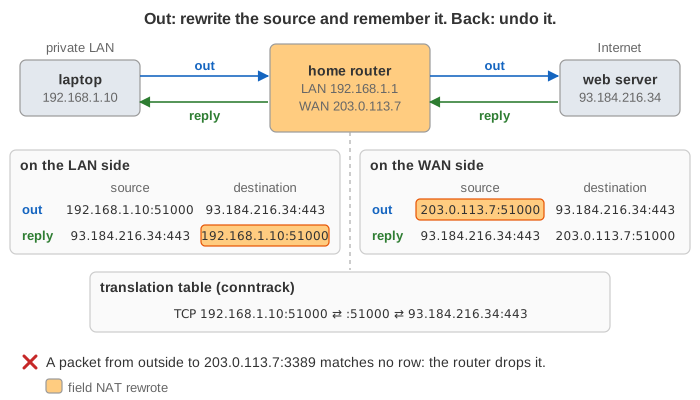
When the laptop sends 192.168.1.10:51000 → 93.184.216.34:443, the router replaces the source with its own public address:
203.0.113.7:51000. This is source NAT; with a changing public address (a home line) Linux calls it
masquerade. The router writes a row: protocol, inside address and port, public port, remote address and port. On Linux
this table is conntrack (conntrack -L lists it). Because the TCP and UDP checksums cover the IP addresses,
NAT recomputes them too.
The reply comes to 203.0.113.7:51000. The router looks up the row by public port and remote address, rewrites the
destination back to 192.168.1.10:51000 and sends it into the LAN. The server never learns the private address.
Demo: 1. One TCP connection out and back.
Choosing the public port
If the host's source port is still free on the public address, the router keeps it (port preservation). If another host already uses it, the router picks a different one. In Demo 2 the laptop and the phone both use port 51000: the laptop keeps 51000 and the phone gets 40000. Replies are told apart by the public port alone. A public address has 65 535 ports per protocol; Linux can reuse a port for different remotes, so the real limit is about 64 k connections to the same server per public address, which matters for carrier-grade NAT, not for a home.
Coming in: only replies get through
A packet from outside is addressed to 203.0.113.7. If no row has its destination port, the router cannot know which
inside host it is for, so it drops it, silently. This is why a machine behind NAT cannot be reached from the Internet
unless it spoke first, and why NAT looks like a firewall. It is not one by design (the filtering depends on the NAT type below, and
IPv6 has no NAT at all), so real routers add a firewall on top. Demo: 3. Unsolicited inbound packets are dropped.
Port forwarding and hairpinning
To run a server behind NAT, you add a static port-forward rule (destination NAT): "TCP to
203.0.113.7:8080 goes to 192.168.1.20:80". The first SYN creates a row like any other, so the NAS's replies
have their source rewritten back to 203.0.113.7:8080 (Demo 4). UPnP IGD and PCP let an application ask the router
for such a rule itself.
Hairpin NAT (NAT loopback) is the case where a host inside uses the public address, e.g. because the NAS's DNS
name points at it. The router must rewrite the destination to the NAS and the source to its own LAN address: without the second
rewrite, the NAS would answer the laptop directly from 192.168.1.20:80, and the laptop, which called
203.0.113.7:8080, would reset that unknown connection. Demo: 10. Hairpin NAT.
Timeouts and keepalives
Rows are not removed when an application closes a socket; the router cannot see that. It only sees packets, so every row has a timer that each packet refreshes. TCP rows follow the handshake and the FINs; UDP and ICMP have no connection, so they only have the timer. The page uses the Linux defaults:
| Row state | sysctl | Timeout |
|---|---|---|
| TCP SYN_SENT / SYN_RECV | nf_conntrack_tcp_timeout_syn_sent / _syn_recv | 120 s / 60 s |
| TCP ESTABLISHED | nf_conntrack_tcp_timeout_established | 432 000 s (5 days) |
| TCP FIN_WAIT / LAST_ACK / TIME_WAIT | _fin_wait / _last_ack / _time_wait | 120 s / 30 s / 120 s |
| UDP, one exchange | nf_conntrack_udp_timeout | 30 s |
| UDP stream (traffic both ways for a while) | nf_conntrack_udp_timeout_stream | 120 s (not modelled) |
| ICMP echo | nf_conntrack_icmp_timeout | 30 s |
A UDP answer that arrives after its row expired is dropped (Demo 5). Home routers often use much shorter timers than Linux defaults. That is why VoIP, games, VPNs and push-notification connections send small keepalive packets every 15–30 s: not for the other side, but to keep the row in the NAT alive.
ICMP, and protocols that carry addresses
An ICMP echo has no ports, so NAT uses its query id the way it uses a port (Demo 6). ICMP error messages
(e.g. "port unreachable") quote the header of the packet that caused them; NAT finds the row from that quote and rewrites the quoted
header too. Protocols that write IP addresses into their payload, like FTP's PORT command or SIP, break under NAT unless the
router has an application-level gateway (ALG) that rewrites the payload as well.
Cone and symmetric NAT
RFC 4787 describes a NAT by two choices. Mapping: does an inside socket get the same public port for every destination (endpoint-independent), or a new one per destination (address- and port-dependent)? Filtering: once a public port is mapped, who may send to it? The old names combine them:
| Old name | Mapping | Filtering: packets accepted from | Hole punching |
|---|---|---|---|
| Full cone | endpoint-independent | anyone | works |
| Restricted cone | endpoint-independent | any port of an IP it sent to | works |
| Port-restricted cone | endpoint-independent | exactly the ip:ports it sent to | works if both sides send |
| Symmetric | new port per destination | exactly the ip:ports it sent to | fails against a port-restricted peer |
RFC 4787 asks for endpoint-independent mapping, since it is what lets peer-to-peer work; Linux masquerade behaves like a port-restricted cone as long as it can keep the port. Demo 9 shows why full cone is the least safe: once the call app has asked STUN, anyone who learns its public port can send to it.
STUN, hole punching and TURN
Two hosts that are both behind NATs cannot simply connect: each one's inbound packets are dropped. The trick is to make both NATs think the other side's packets are replies:
- Each host asks a STUN server "what address do you see me as?" (a Binding request). The answer, e.g.
203.0.113.7:50000, is its public address for that socket. - Through a signalling server, the two hosts exchange these addresses.
- Both send to each other at the same time. The first packet in each direction may be dropped by the far NAT, but it creates a row (a hole) in its own NAT, and the other side's packets then match that row. Demo 7.
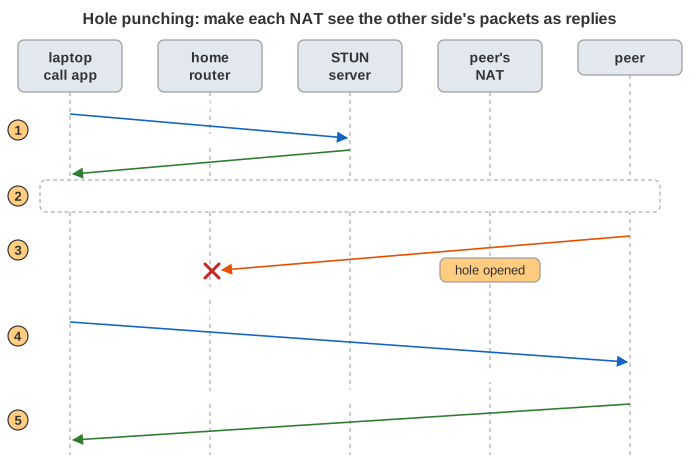
This only works if the public port the peer was told about is the one the NAT uses for the peer. A symmetric NAT
gives the peer's address a new port (Demo 8: STUN saw :40000, the peer is sent from :40001), so the
peer's hole points at the wrong port. Then the call is relayed through a TURN server, which both sides can reach because
both connect out to it. ICE (used by WebRTC) tries all these candidates and picks the best path that works.
Carrier-grade NAT and IPv6
Many ISPs, most mobile networks, no longer have one public address per customer. They put a second NAT in their own network
(CGNAT): your router's "public" address is then from 100.64.0.0/10 and is translated once more, so a whole
neighbourhood shares a few public addresses. Port forwarding on the home router then no longer helps. IPv6 gives every
device a public address, so it needs no NAT; a stateful firewall on the router does the "only replies get in" part.
See also Internet Protocol Layers (NAT as one hop of a packet's trip through all the layers), TCP vs UDP and How an HTTP Connection Is Established.
What the page leaves out
IP fragments, ALGs in detail, NAT64 (IPv6 hosts reaching IPv4 servers), port-block allocation and logging in CGNAT, UPnP / PCP, the UDP stream timeout, randomised source ports (the page uses fixed counters so demos repeat), the firewall rules that usually sit next to NAT, and the ISP's routers between the home and the servers.