Introduction to B-Trees
A B-tree is a tree data structure that keeps data sorted and allows searches, insertions, and deletions in logarithmic amortized time. Unlike self-balancing binary search trees, it is optimized for systems that read and write large blocks of data. It is most commonly used in database and file systems.
The B-Tree Rules
Important properties of a B-tree:
- B-tree nodes have many more than two children.
- A B-tree node may contain more than just a single element.
The set formulation of the B-tree rules: Every B-tree depends on a positive constant integer called MINIMUM, which is used to determine how many elements are held in a single node.
- Rule 1: The root can have as few as one element (or even no elements if it also has no children); every other node has at least MINIMUM elements.
- Rule 2: The maximum number of elements in a node is twice the value of MINIMUM.
- Rule 3: The elements of each B-tree node are stored in a partially filled array, sorted from the smallest element (at index 0) to the largest element (at the final used position of the array).
- Rule 4: The number of subtrees below a nonleaf node is always one more
than the number of elements in the node.
- Subtree 0, subtree 1, ...
- Rule 5: For any nonleaf node:
- An element at index i is greater than all the elements in subtree number i of the node, and
- An element at index i is less than all the elements in subtree number i + 1 of the node.
- Rule 6: Every leaf in a B-tree has the same depth. Thus it ensures that a B-tree avoids the problem of a unbalanced tree.
Searching for a Target in a Set
The psuedocode:
- Make a local variable, i, equal to the first index such that data[i] >= target. If there is no such index, then set i equal to dataCount, indicating that none of the elements is greater than or equal to the target.
-
if (we found the target at data[i])
    return true;
else if (the root has no children)
    return false;
else return subset[i].contains(target);
Adding an Element to a B-Tree
It is easier to add a new element to a B-tree if we relax one of the B-tree rules.
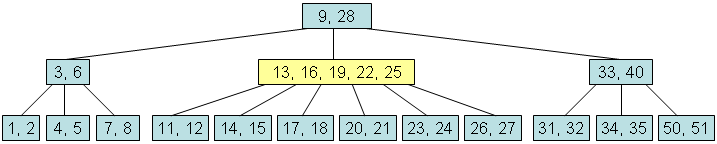
Loose addition allows the root node of the B-tree to have MAXIMUM + 1 elements. For example, suppose we want to add 18 to the tree:

The above result is an illegal B-tree. Our plan is to perform a loose addition first, and then fix the root's problem.
The Loose Addition Operation for a B-Tree
private void looseAdd(int element)
{
   1. i = firstGE(element) // find the first index such that data[i] >= element
   2. if (we found the new element at data[i]) return; // since there's already a copy in the set
   3. else if (the root has no children)
          Add the new element to the root at data[i]. (shift array)
   4. else {
          subset[i].looseAdd(element);
          if the root of subset[i] now has an excess element, then fix that problem before returning.
      }
}

private void fixExcess(int i)
// precondition: (i < childCount) and the entire B-tree is valid except that subset[i] has MAXIMUM + 1 elements.
// postcondition: the tree is rearranged to satisfy the loose addition rule
Fixing a Child with an Excess Element
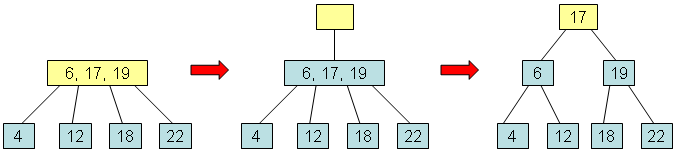
- To fix a child with MAXIMIM + 1 elements, the child node is split into two nodes that each contain MINIMUM elements. This leaves one extra element, which is passed up to the parent.
- It is always the middle element of the split node that moves upward.
- The parent of the split node gains one additional child and one additional element.
- The children of the split node have been equally distributed between the two smaller nodes.

Fixing the Root with an Excess Element
- Create a new root.
- fixExcess(0).
Removing an Element from a B-Tree
Loose removal rule: Loose removal allows to leave a root that has one element too few.
public boolean remove(int target)
{
   answer = looseRemove(target);
   if ((dataCount == 0) && (childCount == 1))
       Fix the root of the entire tree so that it no longer has zero elements;
   return answer;
}

private boolean looseRemove(int target)
{
1. i = firstGE(target)
2. Deal with one of these four possibilities:
  2a. if (root has no children and target not found) return false.
  2b. if( root has no children but target found) {
          remove the target
          return true
      }
  2c. if (root has children and target not found) {
          answer = subset[i].looseRemove(target)
          if (subset[i].dataCount < MINIMUM)
              fixShortage(i)
          return true
      }
  2d. if (root has children and target found) {
          data[i] = subset[i].removeBiggest()
          if (subset[i].dataCount < MINIMUM)
              fixShortage(i)
          return true
      }
}

private void fixShortage(int i)
// Precondition: (i < childCount) and the entire B-tree is valid except that subset[i] has MINIMUM - 1 elements.
// Postcondition: problem fixed based on the looseRemoval rule.

private int removeBiggest()
// Precondition: (dataCount > 0) and this entire B-tree is valid
// Postcondition: the largest element in this set has been removed and returned. The entire B-tree is still valid based on the looseRemoval rule.
Fixing Shortage in a Child
When fixShortage(i) is activated, we know that subset[i] has MINIMUM - 1 elements. There are four cases that we need to consider:
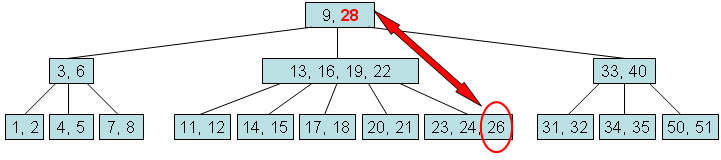
Case 1: Transfer an extra element from subset[i-1]. Suppose subset[i-1] has more than the MINIMUM number of elements.
- Transfer data[i-1] down to the front of subset[i].data.
- Transfer the final element of subset[i-1].data up to replace data[i-1].
- If subset[i-1] has children, transfer the final child of subset[i-1] over to the front of subset[i].
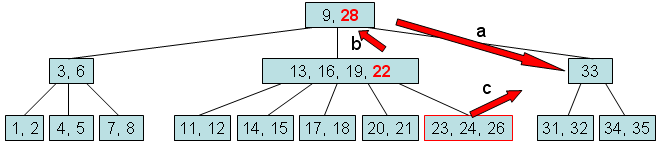
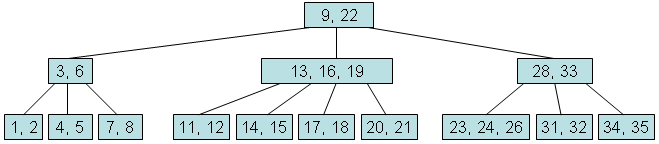
Case 2: Transfer an extra element from subset[i+1]. Suppose subset[i+1] has more than the MINIMUM number of elements.
Case 3: Combine subset[i] with subset[i-1]. Suppose subset[i-1] has only MINIMUM elements.
- Transfer data[i-1] down to the end of subset[i-1].data.
- Transfer all the elements and children from subset[i] to the end of subset[i-1].
- Disconnect the node subset[i] from the B-tree by shifting subset[i+1], subset[i+2] and so on leftward.
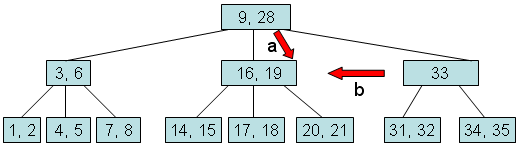
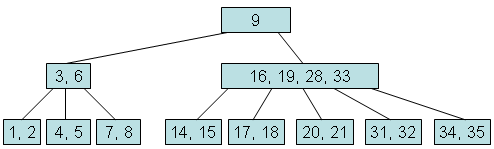
Case 4: Combine subset[i] with subset[i+1]. Suppose subset[i+1] has only MINIMUM elements.
We may need to continue activating fixShortage() until the B-tree rules are satisfied.
Removing the Biggest Element from a B-Tree
private int removeBiggest()
{
   if (root has no children)
       remove and return the last element
   else {
       answer = subset[childCount-1].removeBiggest()
       if (subset[childCount-1].dataCount < MINIMUM)
           fixShortage(childCount-1)
       return answer
   }
}
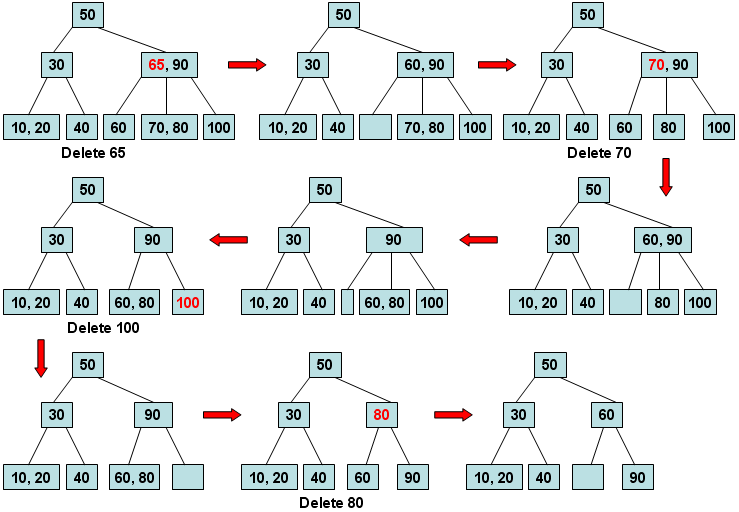
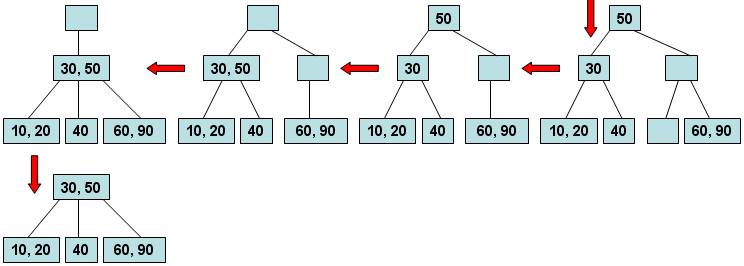
A more concrete example for node deletion
Where B-trees are used
The B-tree exists for one reason: when data lives on disk, the cost that matters is the number of blocks read, not the number of comparisons made. A binary tree over a million keys is about twenty pointer hops, and every hop can be a separate disk read. Make each node a whole page instead, holding hundreds of keys, and the same million keys are three levels deep. That one change is why essentially all durable indexing uses this family of structures.
- Filesystems. NTFS indexes directories and its master file table with B-trees; so do HFS+ and APFS on macOS, XFS, ReiserFS, and Btrfs, which is named after the structure. Ext4's large directories use an htree, a B-tree in all but name.
- Databases. Every mainstream relational engine indexes with this family — PostgreSQL, MySQL's InnoDB, SQLite, Oracle, SQL Server, DB2 — as does MongoDB's WiredTiger storage engine.
- Key-value stores such as Berkeley DB and LMDB, and the metadata layers of many larger systems.
- In-memory containers, increasingly. The cache hierarchy has made
main memory look like the old disk problem in miniature: a cache line
holds many keys, and chasing one pointer per key wastes it. Rust's
standard
BTreeMapis a B-tree rather than a balanced binary tree for exactly this reason, and recent Linux kernels have moved some long-standing red-black trees to B-tree-like structures.
One clarification worth making, because the names get used loosely: a B-tree proper, the structure on this page, stores data in every node. Almost every database index people call a "B-tree index" is really a B+ tree, which keeps the data only in the leaves and chains those leaves together. That is what makes range scans cheap, and it is worth seeing the difference: the B+ tree as a database index page shows one being used to find actual rows in an actual table.